Python basics: variables, lists, dictionaries, conditions, loops and functions
Python is a programming language used to automate tasks, analyse data and build applications. Learning the Python basics means understanding how to write instructions and check what they produce. In this lesson, you will start with simple values to learn how to use variables, organise information and control how a program runs.
You can download the BasesPython.ipynb notebook and its guide (ZIP) or enter the cells as you work through the lesson. Extract the archive into projet-ia; if you have already started a notebook with the same name, back it up before extracting. The values come from Student Performance Factors and are included directly in the cells: you do not need an Excel file to complete these exercises.
Contents
Python basics: variables and types
A variable is a name associated with a value. The instruction score_examen = 67 means “associate the value 67 with the name score_examen”. The = sign performs this assignment; it does not test equality. A name lets you retrieve the value later without writing it again in every calculation.
A value has a type, which determines the operations it supports. Here are four common types described in the Python types documentation.
| Type | What it represents | Example from the lesson |
|---|---|---|
str (string) | Text written between quotation marks in the code | "Low", a level of parental involvement |
int (integer) | A whole number with no fractional part | 67, the first Exam_Score value |
float (floating-point number) | A floating-point number, written with a decimal point in Python | 67.0, obtained by converting the score 67 |
bool (Boolean) | A logical value: true or false | True, False, the results of comparisons introduced later |
# Define the values used in this example
score_examen = 67
presence = 84
implication_parentale = "Low"

# Convert the integer score to a floating-point number
score_decimal = float(score_examen)

# Display the values and their types
print(score_examen, type(score_examen).__name__)
print(score_decimal, type(score_decimal).__name__)
print(implication_parentale, type(implication_parentale).__name__)67 int
67.0 float
Low strHere, 67 and 84 are integers. Calling float(score_examen) converts the score to a floating-point number: 67.0 represents the same quantity with a different type. Python code uses a point as the decimal separator. The quotation marks make "Low" text.
print displays a value below the cell. type identifies its type; the suffix .__name__ gives the short name of that type here. Both are functions already available in Python: you call them using parentheses. The built-in functions documentation explains their roles.
Choose names that describe what a value represents, such as score_examen or presence. Names are case-sensitive: presence and Presence are different names. A name cannot start with a digit. The usual convention uses lowercase letters and underscores between words, as described in PEP 8. Assigning a new value to the same name replaces its previous value; you do not need to declare its type in advance.
Perform calculations with numbers
Python uses + for addition, - for subtraction, * for multiplication and / for division. Division with / produces a float, even when the mathematical result is a whole number.
# Divide the score by 10
print("Score divided by 10:", score_examen / 10)

# Use floor division
print("Floor division result:", score_examen // 10)

# Calculate the remainder
print("Remainder:", score_examen % 10)

# Square the score
print("Score squared:", score_examen ** 2)Score divided by 10: 6.7
Floor division result: 6
Remainder: 7
Score squared: 448967 / 10 gives 6.7. The operators // and % give the quotient rounded down and the remainder, respectively: for these positive integers, 67 contains six tens with a remainder of seven. ** raises a number to a power; the square of 67 is 4,489.
The Python tutorial on numerical operations presents these rules. A comment starts with #: Python ignores what follows it on that line. This lets you explain a calculation without producing additional output.
Work with strings
A string, or str, contains text between single or double quotation marks. Dataset categories such as Low are text, even when they describe a characteristic of a row. A string is therefore not a number whose average you can calculate directly.
# Convert the text to lowercase
print("Lowercase:", implication_parentale.lower())

# Count the characters in the text
print("Number of characters:", len(implication_parentale))

# Convert the score to a string
score_texte = str(score_examen)
print("Converted score:", score_texte, type(score_texte).__name__)

# Join the label and the converted score
print("Score: " + score_texte)Lowercase: low
Number of characters: 3
Converted score: 67 str
Score: 67len counts the characters in a string. lower() returns a new string in lowercase: it is a method, an operation called on a value using a dot. Strings are immutable: this method does not modify the original string.
With two strings, + performs concatenation: it joins them together. str(score_examen) converts the score to text so that it can be included in this expression. Conversely, int and float can convert compatible numerical text to a number; text such as Low cannot become an integer. The string operations documentation describes these behaviours.
Format results with an f-string
An f-string is a string prefixed with f. Expressions inside braces are evaluated and inserted into the text. This avoids joining several pieces with + and explicitly converting each number.
# Insert the values into a formatted string
print(f"First student: score {score_examen}, attendance {presence} %.")

# Display the result with one decimal place
print(f"Score divided by 10: {score_examen / 10:.1f}")First student: score 67, attendance 84 %.
Score divided by 10: 6.7In {score_examen / 10:.1f}, the colon introduces a format: .1f displays one decimal place. The calculation produces 6.7 here. The % symbol after {presence} in the first message is simply text: it indicates the unit of the value 84 without performing a conversion. Formatting does not change the values stored in variables. The formatted string tutorial explains this notation.
Lists: keep several values in order
A list holds values in a given order. It is written between square brackets, with commas separating the elements. To work with several scores, we use the first five values in the Exam_Score column: 67, 61, 74, 71 and 70. We will keep this order throughout the examples and the final exercise.
# Create a list of scores
notes_examens = [67, 61, 74, 71, 70]

print("Scores:", notes_examens)

# Read the first item at index 0
print("First:", notes_examens[0])

# Read the last item using a negative index
print("Last:", notes_examens[-1])

# Select indexes 1 and 2; index 3 is excluded
print("Slice [1:3]:", notes_examens[1:3])

# Count the items in the list
print("Number of scores:", len(notes_examens))Scores: [67, 61, 74, 71, 70]
First: 67
Last: 70
Slice [1:3]: [61, 74]
Number of scores: 5![The list notes_examens contains 67, 61, 74, 71 and 70, with indices 0 to 4 and -5 to -1; notes_examens[1:3] contains 61 and 74.](https://mlwebapp.com/wp-content/uploads/2026/10/python-basics-list-indices-en-2026-10-12.webp)
[1:3] keeps positions 1 and 2, excluding position 3.An index is the position of an element. The five elements here have indices 0 to 4. notes_examens[-1] refers to the last element; negative indices count from the end. len gives the number of elements, which is 5. notes_examens[1:3] is a slice: a new list starting at index 1, included, and stopping before index 3, giving [61, 74]. See the Python tutorial on lists.
A list can be modified. The append method adds an element at the end. To preserve the five scores used in the following examples, we apply it to a copy. The score 71 added below comes from the sixth data row of the workbook.
# Create an independent copy of the list
notes_etendues = notes_examens.copy()
sixieme_score = 71

# Append a score to the copy
notes_etendues.append(sixieme_score)

# Compare the copy with the original list
print("Six scores:", notes_etendues)
print("Original five scores:", notes_examens)

# Get a sorted list without changing the original
print("Sorted scores:", sorted(notes_examens))Six scores: [67, 61, 74, 71, 70, 71]
Original five scores: [67, 61, 74, 71, 70]
Sorted scores: [61, 67, 70, 71, 74]copy() creates a new list of numbers here. sorted also returns a new list, in ascending order, without changing notes_examens. To reverse the order and sort in descending order, pass reverse=True to sorted, as in print("Scores sorted in descending order:", sorted(notes_examens, reverse=True)).
A simple assignment such as autre_liste = notes_examens would give two names to the same list: adding an element through either name would be visible through the other. The distinction between a copy and another reference matters as soon as you start transforming data. The list methods documentation describes the available operations.
Dictionaries: retrieve information by its key
A dictionary associates keys with values. The pairs are written between braces, with a colon separating each key from its value. Instead of asking for “the value at position 0”, you can ask for “the value associated with Attendance”. This structure is useful for representing several pieces of information from the first row.
# Group the information in a dictionary
eleve = {
    "Hours_Studied": 23,
    "Attendance": presence,
    "Exam_Score": score_examen,
}
print(eleve)

# Read the value associated with the Exam_Score key
print("Score:", eleve["Exam_Score"])

# Provide a fallback value for a missing key
print("Identifier:", eleve.get("Student_ID", "Not present in the file")){'Hours_Studied': 23, 'Attendance': 84, 'Exam_Score': 67}
Score: 67
Identifier: Not present in the fileThe key "Exam_Score" gives access to 67. Here, get provides replacement text for "Student_ID", which is absent from the dictionary. Keys are unique: assigning a value to an existing key replaces the associated value. Python preserves their insertion order. See the introduction to dictionaries.
Compare values and combine tests
A comparison produces a Boolean: True if the test is true, or False otherwise. == tests equality, != inequality, > and < strict ordering, and >= and <= ordering that includes equality. Do not confuse == with the assignment sign =.
# Compare the score with the threshold of 70
atteint_seuil = score_examen >= 70

# Compare attendance with the threshold of 80
presence_elevee = presence >= 80

print("Score >= 70:", atteint_seuil)
print("Attendance >= 80:", presence_elevee)

# Check that both conditions are true
print("Both conditions:", atteint_seuil and presence_elevee)

# Check that at least one condition is true
print("At least one condition:", atteint_seuil or presence_elevee)

# Negate the score comparison
print("Score < 70:", not atteint_seuil)Score >= 70: False
Attendance >= 80: True
Both conditions: False
At least one condition: True
Score < 70: True67 is not at least 70, so the first test gives False. 84 is at least 80, so the second gives True. Logical operators combine these results. and requires both tests to be true; or requires at least one; not reverses the truth value. The Boolean operations documentation explains how they work. Use parentheses when combined tests become difficult to read.
Choose instructions with if, elif and else
A condition selects which instructions to run based on the result of a test. if checks a first case; elif checks another if the preceding tests are false; else handles the remaining cases. We place the score in one of three intervals using the thresholds 70 and 60, chosen for this exercise.
# Choose the score range with if, elif and else
if score_examen >= 70:
    tranche_score = "70 or higher"
elif score_examen >= 60:
    tranche_score = "Between 60 and 69"
else:
    tranche_score = "Below 60"

# Display the selected range
print(tranche_score)Between 60 and 69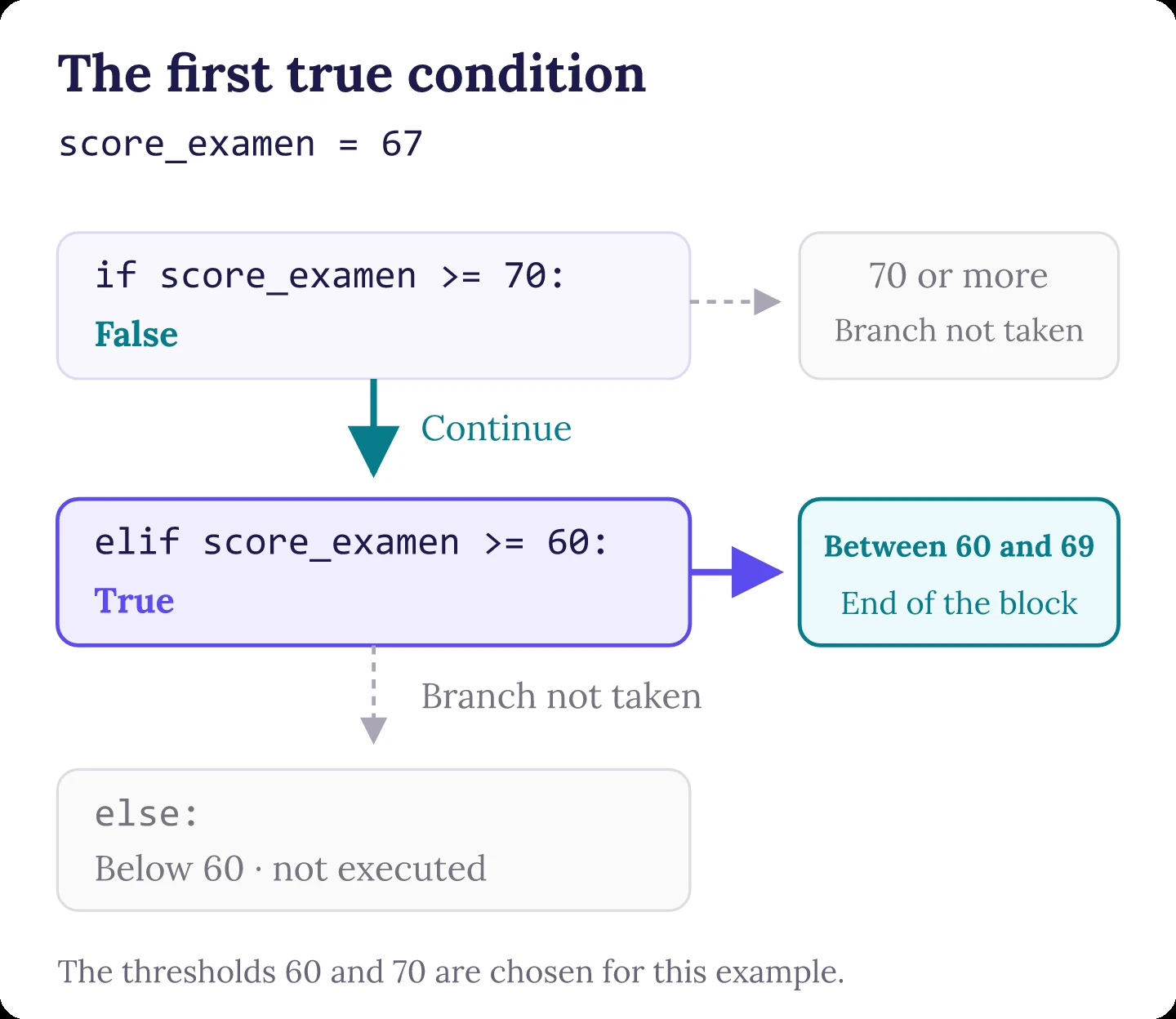
score_examen = 67, the first test is false and the second is true. The else branch does not run.Python checks the tests in order and runs the first block whose condition is true. Starting with score_examen >= 60 would also put scores of 70 or more into that first branch: the order is part of the rule. The Python tutorial on if statements explains this behaviour.
The colon (:) introduces a block. Indentation, the spaces at the beginning of lines, identifies the instructions that belong to it. Use four spaces, as recommended in PEP 8, and keep the same indentation within the block. The final print returns to the left edge: it runs after the interval has been selected.
Repeat instructions with loops
Iterate over values with for
A loop repeats instructions. for iterates over the elements of a collection. On each iteration, the name score receives the next value in the list, until the last one. Here is how to add the five scores without writing five separate instructions.
# Initialize the total before the loop
total = 0

# Loop over the scores and add them to the total
for score in notes_examens:
    total += score
    print("Score:", score)

print("Total:", total)

# Divide the total by the number of scores to calculate the mean
print("Mean:", total / len(notes_examens))Score: 67
Score: 61
Score: 74
Score: 71
Score: 70
Total: 343
Mean: 68.6total starts at 0. total += score adds the current value to the running total; it is equivalent here to total = total + score. After five iterations, the total is 343. The expression total / len(notes_examens) divides it by the number of scores, giving their mean: 68.6. Python also provides sum to add a list of values directly, as we will do in the function below.
Get both the index and the value
When you need the position as well as the value, enumerate provides both on each iteration as a pair called a tuple. A tuple is an ordered collection whose elements cannot be reassigned. The two names separated by a comma receive the index and score respectively: this assignment is called unpacking. The index starts at 0 by default.
# Loop over each score and its index
for indice, score in enumerate(notes_examens):
print(f"Index {indice}: {score}")Index 0: 67
Index 1: 61
Index 2: 74
Index 3: 71
Index 4: 70The loop produces five lines, with indices 0 to 4. You do not have to manage a counter yourself for this task. enumerate is a built-in Python function, like len and sum.
Repeat while a condition remains true
while repeats a block while a condition remains true. We can also go through the five values using an index that we advance ourselves.
# Start at the first index in the list
indice = 0

# Continue while the index is within the list
while indice < len(notes_examens):
    print(f"Index {indice}: {notes_examens[indice]}")
    # Move to the next index so the loop can finish
indice += 1Index 0: 67
Index 1: 61
Index 2: 74
Index 3: 71
Index 4: 70indice += 1 advances the index until it reaches 5. The test indice < len(notes_examens) then becomes false and the loop stops. Forgetting this increment would create an infinite loop. If that happens, interrupt the cell using the notebook’s stop button. For iterating over a list, for is more direct; while is useful when stopping depends on a changing condition. Both forms are covered in the control flow documentation.
Functions: give a reusable calculation a name
A function groups instructions under a name. Here, it receives a list through its parameter scores and passes the result back to its caller with return. def creates the definition; the calculation runs only when we call the function with a value between parentheses.
# Define a function that calculates the mean of a non-empty list
def calculer_moyenne(scores):
    """Return the mean of a non-empty list."""
    return sum(scores) / len(scores)

# Call the function with the list of scores
moyenne = calculer_moyenne(notes_examens)
print("Mean:", moyenne)

# Check the type of the result
print("Type:", type(moyenne).__name__)Mean: 68.6
Type: float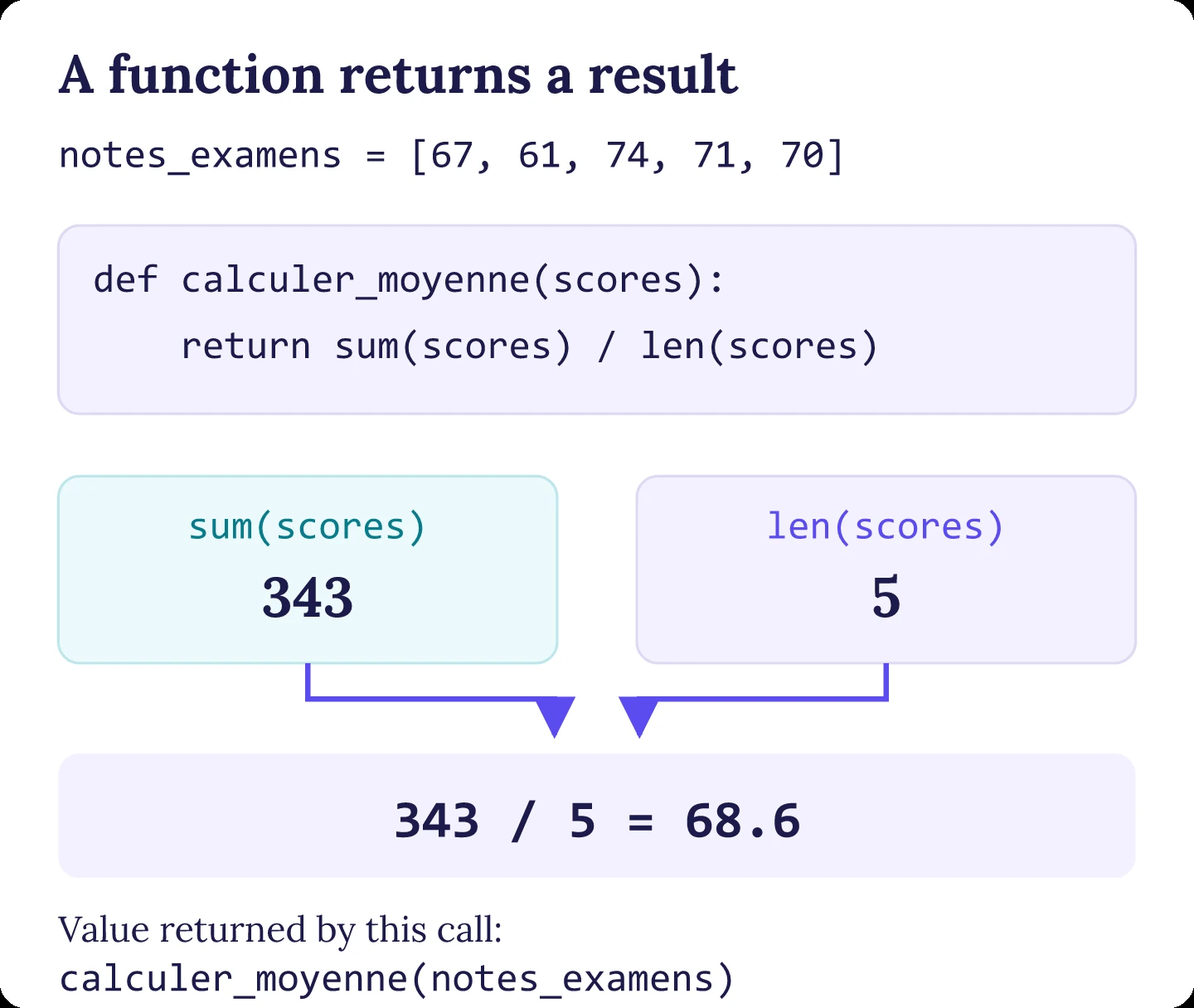
calculer_moyenne(notes_examens) supplies the list to the parameter scores; return returns 68.6.The parameter is the name in the definition; the argument is the value supplied when calling the function, here the list notes_examens. The text between triple quotation marks is a docstring: it describes what the function does. The name scores is local to the function; it does not replace notes_examens elsewhere in the notebook. For more detail, see the functions documentation.
The function expects a non-empty list of numbers: with an empty list, len(scores) is 0 and the division fails. This requirement must remain explicit. return provides a value that can be reused, while print displays a message. Here, we store the result in moyenne before displaying it.
Understand floating-point numbers and rounding
A float generally represents a number using a binary approximation. Some decimal values therefore cannot be stored exactly. To see this with our mean, we can ask for more decimal places than are normally displayed.
# Display the mean with 17 decimal places
print(f"Mean to 17 decimal places: {moyenne:.17f}")

# Format the display to two decimal places
print(f"Mean to 2 decimal places: {moyenne:.2f}")

# Round the value to one decimal place
print("Rounded to one decimal place:", round(moyenne, 1))Mean to 17 decimal places: 68.59999999999999432
Mean to 2 decimal places: 68.60
Rounded to one decimal place: 68.6The mathematical result is 68.6, but its approximate internal representation becomes visible when many decimal places are displayed. .2f produces the readable display 68.60; it does not make the internal representation exact. The floating-point documentation explains why this behaviour is normal.
round returns a rounded value. When a number is exactly halfway between two possible results, Python chooses the even result. Distinguish this rule from the approximation of the original number. For the rest of the course, remember that display rounding helps readability and that the required precision depends on the calculation; we will not round every intermediate step. See the definition of round.
Worked exercise: summarise five scores with Python
In a new cell of BasesPython.ipynb, use notes_examens and calculer_moyenne to:
- display the number of scores, their mean to one decimal place and their maximum;
- use
forandifto build a list of scores that are at least 70; - display that list and the number of values it contains.
max returns the largest value in this non-empty list. Work with the five values in notes_examens, without adding the sixth value used to demonstrate append. Try your own solution first. The solution is also included in the last cell of the downloadable notebook.
Show the solution and its result
# Prepare a list for the selected scores
scores_retenus = []

# Keep only scores greater than or equal to 70
for score in notes_examens:
    if score >= 70:
        scores_retenus.append(score)

# Display the statistics and selected scores
print("Number of scores:", len(notes_examens))
print(f"Mean: {calculer_moyenne(notes_examens):.1f}")
print("Maximum:", max(notes_examens))
print("Scores >= 70:", scores_retenus)
print("Number of scores >= 70:", len(scores_retenus))Number of scores: 5
Mean: 68.6
Maximum: 74
Scores >= 70: [74, 71, 70]
Number of scores >= 70: 3The loop checks each score and keeps those that meet the threshold. The five values add up to 343; 343 / 5 gives 68.6. The maximum is 74, and three scores are at least 70. These results describe only the five values in the list: they are neither statistics for the full dataset nor an evaluation of a model.
Recognise and fix common errors
An error appears below the cell that produced it. Start with its last line, which gives the error type and a message. Then go back to the indicated line of code. Fix the cause and rerun the cell before continuing with variables that may not have been created.
NameError: a variable is not defined in the kernel
If notes_examens or calculer_moyenne is not defined, check the spelling and run the cell that creates it first. After a restart, old outputs may still be visible even though the variables are no longer in memory. Rerun the cells from top to bottom.
TypeError: text and numbers have been mixed
"Mean: " + moyenne attempts to combine a string and a number without conversion. Use an f-string, such as print(f"Mean: {moyenne:.1f}"), or convert the number with str. Text does not become numerical just because it looks like a number: check its type and content before calculating.
IndexError and KeyError: a missing position or key
For a list of five elements, zero-based indices run from 0 to 4: notes_examens[5] raises an IndexError. Negative indices count from the end; use notes_examens[-1] for the last element. In a dictionary, eleve["attendance"] raises a KeyError if the key is "Attendance": case matters. When a key may be absent, get lets you supply a replacement value.
IndentationError: a block is not indented correctly
After if, for, while or def, indent the block’s instructions four spaces to the right. Check the colon and avoid mixing spaces and tabs. An instruction that returns to the left edge is no longer part of that block.
What to remember and the next project step
You started by naming a value and understanding its type, then learned to calculate and display a result. Lists preserve an order; dictionaries link keys to information. Comparisons produce Booleans, conditions select instructions, loops repeat them, and functions group a calculation so that it can be reused. The final exercise brings these ideas together to summarise and filter a list of scores.
Save BasesPython.ipynb after restarting the kernel and running all its cells. You should recover the five scores and the mean 68.6. The outputs shown were calculated in a fresh kernel with Python 3.14.8. This lesson uses only Python’s built-in functions and types: no additional library or file reading is required.
Resources for further study
- To review an instruction, consult the official Python tutorial, especially its sections on numbers, data structures and functions.
- For the source of the example values: Student Performance Factors — Lai Ng., Kaggle.
