Python mutability and copies: avoiding unintended changes

Python mutability explains why a change to a list can appear under several variable names. The statement b = a does not copy the object referred to by a: it binds another name to the same object. To prepare data while preserving its original state, you need to distinguish assignment, a shallow copy and a deep copy.
This article builds on Python basics. You will learn to recognise a mutable object, check whether two names refer to the same object, and choose an appropriate copy for a list or a dictionary containing a list. These distinctions matter before you transform the data used by a machine learning model.
Before you start
You should know how to assign a value to a variable, access a list element and call a function. If your environment is not ready, follow Install Python with uv, VS Code and Jupyter. Then open or create MutabiliteCopiesPython.ipynb, select your project’s Python kernel in the top-right corner of VS Code, and run the cells in order.
The notebook uses only Python and the standard-library copy module. The examples were run with Python 3.14.8.
Download the notebook with its verified outputs as a ZIP file. Extract the archive and open MutabiliteCopiesPython.ipynb in VS Code. The cells shown below can also be copied individually and run in your notebook.
Contents
Objects, types and Python mutability
An object is a value handled by Python, with a type and an identity. Its type determines the available operations, such as adding two integers, appending an element to a list or looking up a dictionary key. Its identity distinguishes it from other objects, even when their values are equal. These concepts are defined in Python’s official data model.
An object is mutable if its state can change after it is created. A list keeps its identity when you change an element or rearrange its elements. Python mutability therefore concerns changes to the existing object.
An immutable object does not allow these changes. To use a different value, you reassign the variable name to another object. Immutability is a property of the object, not of the name referring to it.
| Types | Mutable and immutable objects |
|---|---|
int, float, bool, str | These objects are immutable. A variable name can still be reassigned. |
list | A list is mutable: its elements, length and order can change. |
dict | A dictionary is mutable: you can add or remove entries, or change the value associated with a key. |
set | A set is mutable: you can add or remove an element. |
tuple | A tuple is immutable. A mutable object it contains can still be changed. |
The type() function identifies an object’s type. In the first cell, .__name__ displays the name of that type. The scores_reference tuple stores the five original scores; the later examples build their lists from this reference.
# Create a tuple of reference scores
scores_reference = (67, 61, 74, 71, 70)

# Display the type of a score, the tuple and its list conversion
print("score:", type(scores_reference[0]).__name__)
print("collection:", type(scores_reference).__name__)
print("list:", type(list(scores_reference)).__name__)score: int
collection: tuple
list: listReassigning a name does not change an integer
Initially, score_initial and score_selectionne both refer to the value 67. When score_selectionne is reassigned to 74, score_initial remains 67. Reassigning a variable in Python does not modify the object it previously referred to.
# Keep a reference to the first score
score_initial = scores_reference[0]
score_selectionne = score_initial

# Reassign the second name to another score
score_selectionne = scores_reference[2]

# Display the values associated with both names
print("initial:", score_initial)
print("selected:", score_selectionne)initial: 67
selected: 74Why two variables can share a list
A reference allows a name or a container to refer to an object. After notes_a_trier = notes_examens, both names give access to the same list. This additional name is sometimes called an alias. The documentation for the copy module explicitly states that assignment does not copy objects.
The is operator compares object identity. The .sort() method sorts a list in place, meaning that it modifies the existing object. You can check for sharing before the sort, then observe the effect through the original name.
# Create a list and give it a second name
notes_examens = list(scores_reference)
notes_a_trier = notes_examens

# Check whether both names refer to the same object
print("same object:", notes_a_trier is notes_examens)

# Sort the list in place, then inspect the original list
notes_a_trier.sort()
print("original list:", notes_examens)same object: True
original list: [61, 67, 70, 71, 74]The output True confirms that both names refer to the same object. Sorting produces [61, 67, 70, 71, 74], including when you display notes_examens. If you wanted to preserve the order of the workbook rows, this assignment was unsuitable. The scores themselves have not changed, but their order in the working list has.
Choosing an appropriate list copy
The .copy() method creates a shallow copy: it builds a new container that still refers to the objects held by the original container. You can also copy a list with list(notes_examens) or notes_examens[:]. These operations have the same limitation when the list contains other mutable objects.
For this list of integers, a shallow copy is enough to preserve the original list while sorting. This illustrates how Python mutability affects copying: immutable integers can be shared while each list keeps its own order of elements. Compare values with == and identities with is before changing the copy.
# Create the original list and a separate copy
notes_examens = list(scores_reference)
notes_triees = notes_examens.copy()

# Compare the lists' values and identities
print("same values:", notes_triees == notes_examens)
print("same object:", notes_triees is notes_examens)

# Sort the copy, then display both lists
notes_triees.sort()
print("original:", notes_examens)
print("sorted copy:", notes_triees)same values: True
same object: False
original: [67, 61, 74, 71, 70]
sorted copy: [61, 67, 70, 71, 74]The two lists initially have the same values, so == returns True. They are nevertheless distinct objects, so is returns False. After sorting, notes_examens keeps the original order. Replacing an integer in the copy would also leave the corresponding element of the other list unchanged.
A tuple can contain a mutable object
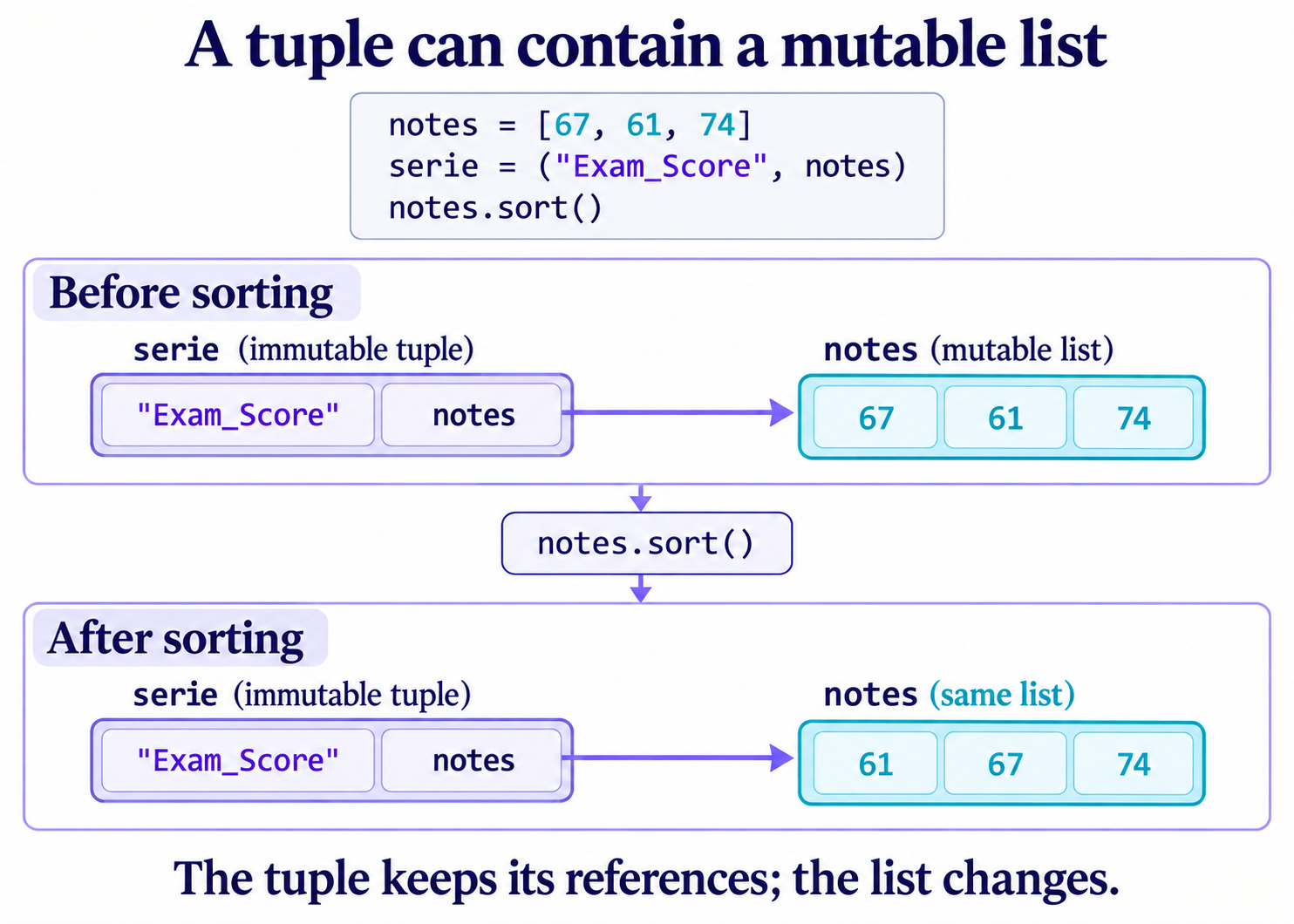
A tuple’s immutability fixes the references held by its elements. It does not make a referenced list immutable. In the next example, the tuple contains the column name and a list of three scores. Sorting that list changes what you see when you display the tuple.
# Place a list inside a tuple
notes = list(scores_reference[:3])
serie = ("Exam_Score", notes)

# Change the list held by the tuple
notes.sort()

# Display the tuple and check whether the list is shared
print(serie)
print("shared list:", serie[1] is notes)('Exam_Score', [61, 67, 74])
shared list: TrueThe tuple keeps its two elements: the string "Exam_Score" and the reference to the list. You cannot directly replace serie[1] with another list, but you can change the list that element already refers to. Converting a list to a tuple therefore does not automatically isolate the objects it contains.
Sets in Python
A Python set is a collection of distinct elements. Unlike a list, a set does not guarantee element order. To create a non-empty set, place its elements between braces {}, separated by commas. In this example, champs_a_verifier contains two field names, Hours_Studied and Attendance. The .add() method adds a third field, Exam_Score.
A set is mutable: elements can be added or removed after it is created. Python also provides frozenset, an immutable set type. The official tutorial’s data structures chapter explains these uses.
# Create a set containing two field names
champs_a_verifier = {"Hours_Studied", "Attendance"}

# Add another field name to the set
champs_a_verifier.add("Exam_Score")

# Count the elements
print("number of fields:", len(champs_a_verifier))

# Check whether a field name is present
print("Exam_Score present:", "Exam_Score" in champs_a_verifier)number of fields: 3
Exam_Score present: TrueShallow and deep copies of a dictionary
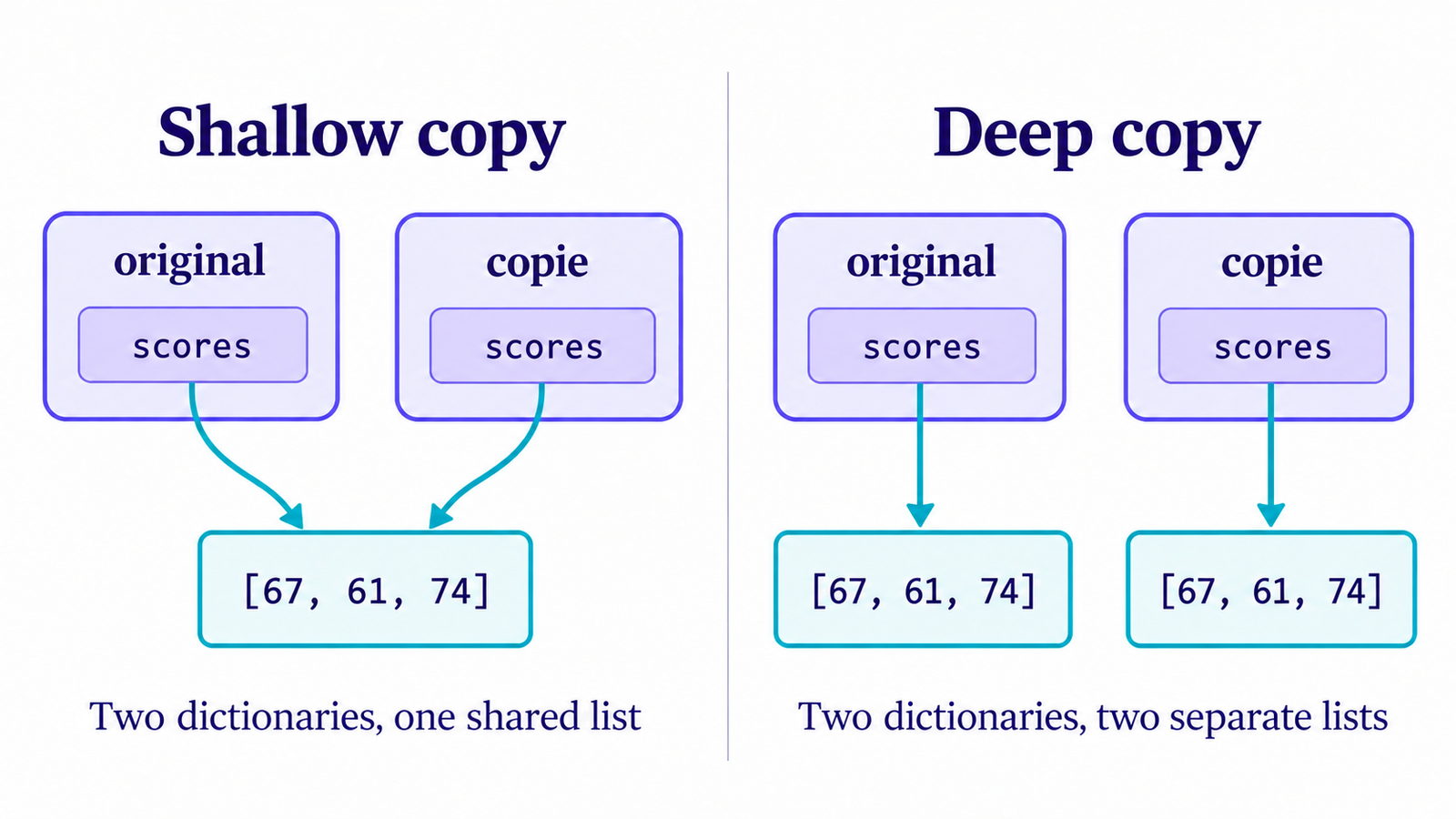
The distinction becomes visible in a dictionary containing a list as one of its values. original.copy() creates a distinct dictionary, but its "scores" key still refers to the list used by original. Copying the outer container has not copied the nested objects. This is another consequence of Python mutability.
Observing shared data after a shallow copy
# Create a dictionary containing a list, then make a shallow copy
original = {"scores": list(scores_reference[:3])}
copie = original.copy()

# Compare the dictionaries and the lists they contain
print("same dictionary:", copie is original)
print("same list:", copie["scores"] is original["scores"])

# Sort the shared list and inspect both dictionaries
copie["scores"].sort()
print("original:", original["scores"])
print("copy:", copie["scores"])same dictionary: False
same list: True
original: [61, 67, 74]
copy: [61, 67, 74]The dictionaries are distinct, but their lists are not. Sorting copie["scores"] therefore also affects original["scores"]. If you only replaced the value associated with the key in the new dictionary, the other dictionary would keep its own association. Here, the operation changes the shared list.
Using a deep copy when the structure requires it
A deep copy traverses a compound structure to copy the relevant nested objects; immutable objects may remain shared. For this dictionary of lists and integers, deepcopy() also creates a distinct inner list. The from statement imports this function from copy, which is part of the standard library.
# Import the deep-copy function
from copy import deepcopy

# Copy the dictionary and the list it contains
original = {"scores": list(scores_reference[:3])}
copie = deepcopy(original)

# Check whether the lists are distinct
print("same list:", copie["scores"] is original["scores"])

# Sort the copied list, then display both lists
copie["scores"].sort()
print("original:", original["scores"])
print("copy:", copie["scores"])same list: False
original: [67, 61, 74]
copy: [61, 67, 74]The original list remains [67, 61, 74], and only the copy becomes [61, 67, 74]. Choose the copy according to the operation you plan to perform: a deep copy may duplicate more data than necessary. For a known structure, copying only the objects you will change can be enough.
Preserving data passed to a function
A function parameter refers to the object passed to it. A function can therefore change a list belonging to its caller if it performs an in-place operation. When you want to preserve the input and produce a result, choose an operation that creates that result separately.
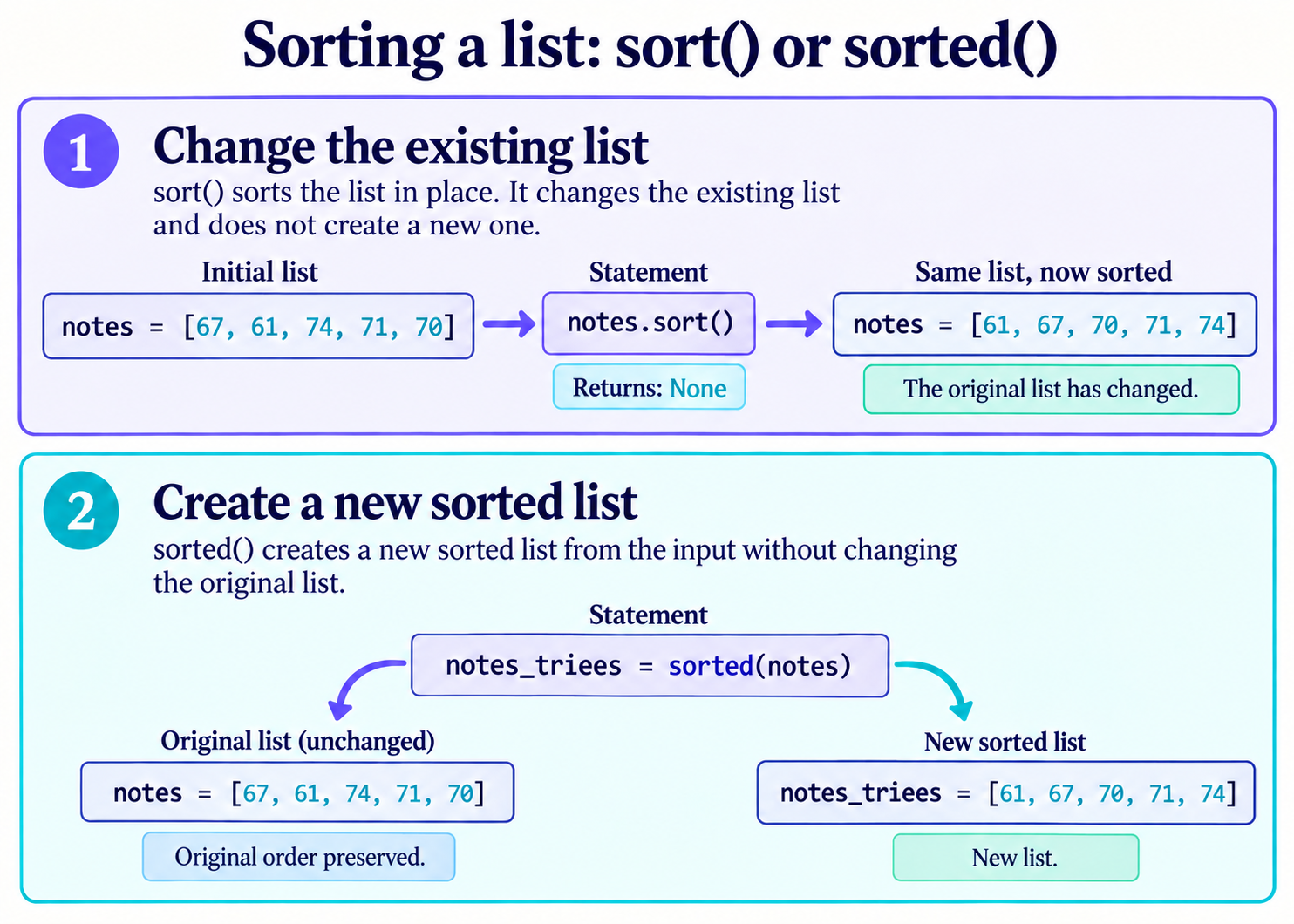
The built-in sorted() function returns a new sorted list, whereas .sort() changes the existing list. This distinction is described in Python’s official sorting guide. The trier_scores function therefore uses sorted() to preserve its input.
# Define a function that returns a new sorted list
def trier_scores(scores):
    return sorted(scores)

# Call the function with the score list
notes_examens = list(scores_reference)
resultat = trier_scores(notes_examens)

# Compare the input with the result without changing the input
print("input:", notes_examens)
print("result:", resultat)input: [67, 61, 74, 71, 70]
result: [61, 67, 70, 71, 74]The result is sorted and the input keeps its order. This separation helps you check successive data transformations: you can compare the original state with the result without rebuilding the input. It is not a general guarantee for every function; you need to examine the operations each function uses.
Practice: preparing a working copy
You have an original dictionary containing the "Exam_Score" field and the list of five original scores. Create a distinct travail dictionary, sort its scores in ascending order and keep the original scores in their initial order. The field name must stay unchanged.
Start by deciding which objects need to be independent. The outer dictionary will be changed to associate it with another list, and that list will then be sorted. The string describing the field does not need to be copied for this operation.
Show the solution and its checks
# Create the original dictionary
original = {
    "champ": "Exam_Score",
    "scores": list(scores_reference),
}

# Copy the dictionary and its list before sorting
travail = original.copy()
travail["scores"] = original["scores"].copy()
travail["scores"].sort()

# Display the values and check whether the lists are distinct
print("original:", original["scores"])
print("working copy:", travail["scores"])
print("field preserved:", travail["champ"])
print("distinct lists:", travail["scores"] is not original["scores"])

# Check that the original is unchanged and the copy is sorted
assert original["scores"] == list(scores_reference)
assert travail["scores"] == sorted(scores_reference)
assert travail is not originaloriginal: [67, 61, 74, 71, 70]
working copy: [61, 67, 70, 71, 74]
field preserved: Exam_Score
distinct lists: TrueThe first copy creates the working dictionary. The second creates the list you will sort; assigning it to travail["scores"] replaces the shared reference. The two lists can now change independently. The assert statements check the results: a false condition would stop the cell with an error.
For this specific structure, deepcopy(original) would also work. The targeted copy makes it clear what is being isolated. If the dictionary contained several levels of mutable objects that you needed to change, you would have to adapt the copy to that structure.
Common mistakes to recognise
Assigning the return value of sort to a variable
The .sort() method returns None, which here means that no result value is returned. It has already changed the list. An assignment such as notes_examens = notes_examens.sort() therefore removes that name’s reference to the list. Observe the return value and the sorted list separately.
# Create a list of scores
notes_examens = list(scores_reference)

# Sort the list in place and capture the return value
resultat = notes_examens.sort()

# Display the return value of sort() and the changed list
print("sort return value:", resultat)
print("list after sorting:", notes_examens)sort return value: None
list after sorting: [61, 67, 70, 71, 74]To keep the same object, simply call notes_examens.sort(). To obtain another list while preserving the input, use notes_triees = sorted(notes_examens).
Confusing equality with identity
Two lists can have equal values without being the same object. Use == to compare their values and is to check whether an object is shared. Avoid inferring a copying rule from the identity of small integers or strings: Python may reuse some immutable objects.
Reusing an already modified list in the notebook
A cell run more than once uses the variables already present in the kernel. If a list has been sorted, its previous order does not return automatically. The examples therefore rebuild their lists with list(scores_reference). To reproduce every output, restart the kernel and choose Run All.
Python mutability: 5 rules to remember
Use these five Python mutability rules to choose an appropriate copy and preserve the original data in the examples covered by this lesson.
- Identify shared references. Assignment gives another name to the same object. Check for sharing with
isbefore changing a list. - Copy a list of immutable elements. A shallow copy with
.copy()creates a distinct list. For the integer scores in this example, it is enough to preserve the original order. - Examine every level of a structure. A shallow dictionary copy may still share its lists. Also copy the list you will change, as in the exercise.
- Choose a deep copy when it is needed. In this dictionary,
deepcopy()recreates the inner list. A deep copy may duplicate more objects than necessary; a targeted copy is sometimes sufficient. - Prefer an operation that preserves the input.
sorted()returns a new list;.sort()changes the existing list and returnsNone. Choose the operation according to the result you need.
