Read a traceback and handle common Python exceptions

To understand Python exceptions, start with the last line of the diagnostic, then find the statement that failed and the values it uses. A traceback, or stack traceback, shows the sequence of calls that led to the failure. It helps you decide whether to fix the program or handle an anticipated situation, such as input that cannot be converted.
You will deliberately trigger a type error, read its output, correct the calculation and use try, except, else, finally and raise. The aim is to produce a result you can check while keeping errors that need fixing visible.
Contents
Errors, exceptions and tracebacks: three distinctions
An exception signals a situation that interrupts the normal flow of a block of code. When it is not handled, Python usually displays its type, its error message and a stack traceback. In a notebook, execution of that cell stops; the kernel can still run other cells. Variables that have already been defined are not erased.
A syntax error prevents Python from parsing the code, for example when the colon after an if is missing. It is reported as SyntaxError, which also belongs to the exception hierarchy. A try in that same cell cannot catch this syntax error, because the code must be parsed before it can run. By contrast, adding incompatible types can be syntactically valid and fail during execution. The Python documentation on errors and exceptions explains this distinction.
Read a traceback from a failed calculation
The values 23, 19 and 24 come from the Hours_Studied column in StudentPerformanceFactors.xlsx. This column records the number of study hours per week.
To observe a failure, deliberately write "19" in quotation marks. This change puts a string in the list.
heures_etude = [23, "19", 24]
total_heures = sum(heures_etude)
print("Total:", total_heures)---------------------------------------------------------------------------
TypeError Traceback (most recent call last)
Cell In[2], line 2
1 heures_etude = [23, "19", 24]
----> 2 total_heures = sum(heures_etude)
3 print("Total:", total_heures)
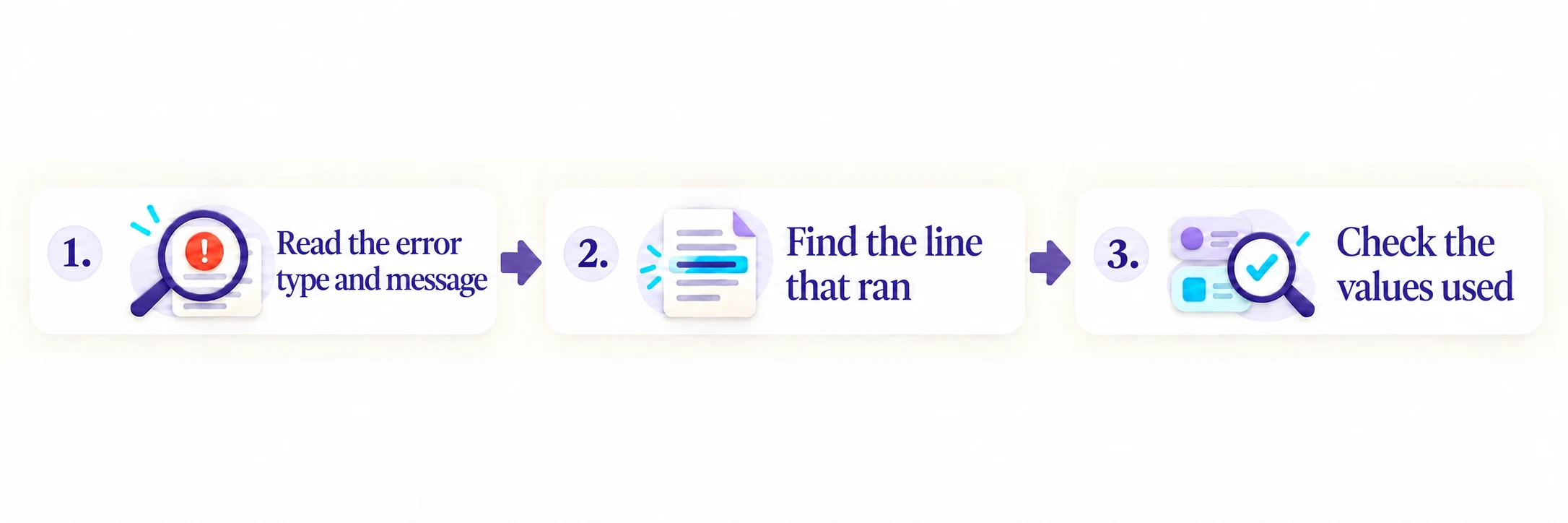
TypeError: unsupported operand type(s) for +: 'int' and 'str'The output above comes from running the notebook. Python’s diagnostic message is shown unchanged. Here is how to read it:
- Start with the last line.
TypeErrorindicates an operation applied to an incompatible type. Here, the message says that addition encounters an integer,int, and a string,str. - Find the line that ran.
Cell In[2], line 2refers to the second line of the cell run with execution count 2. The arrow points tosum(heures_etude). In a script, you will see a file name and a line number instead. - Check the values used. The problem comes from the
"19"introduced on the preceding line. The place where Python detects the failure is not necessarily where the incorrect data was created.
A longer traceback may pass through several functions or library files. Calls appear from oldest to most recent, up to the point of failure. Also find the line in your own code that supplied the inputs. If exceptions are chained, read the messages linking their tracebacks: the last exception may have occurred while an earlier one was being handled. The official traceback module documentation describes this information and how it is displayed.
Fix the cause and recalculate
Restore the three numbers from the workbook, then recalculate the total and mean in the same cell. Redefining the input avoids reusing an old total_heures if the previous assignment failed.
heures_etude = [23, 19, 24]
total_heures = sum(heures_etude)
print("Total:", total_heures)
print("Mean:", total_heures / len(heures_etude))Total: 66
Mean: 22.0The total is 66, and the mean of these three observations is 22.0 hours per week.
Recognize common Python exceptions in your project
The exception name guides your investigation. It does not determine the fix on its own: a ValueError can come from invalid user input or a mistake in data preparation. The definitions below follow the built-in exception reference.
| Exception | What it signals | What to check |
|---|---|---|
NameError | A name is not defined in this context. | Check its spelling and run the cell that defines it. |
TypeError | An operation receives an incompatible type. | Inspect the objects, such as a number and a string in a sum. |
ValueError | The type is appropriate, but the value is unacceptable. | Check the format or validation rule. |
IndexError | An index is outside the bounds of a sequence. | Check the list length and the requested index. |
KeyError | A requested key is missing. | Check the dictionary keys or column names. |
ZeroDivisionError | A division has a zero denominator. | Before calculating a mean, check that the list is not empty. |
FileNotFoundError | A requested file or directory cannot be found. | Check the path and working directory. |
ModuleNotFoundError | An imported module cannot be found. | Check its name and the environment used by the selected kernel. |
A misspelled name or a missing column usually calls for a correction to the code or expected file. Malformed user input can instead be rejected with a clear message. This distinction helps you decide where an exception handler is useful.
Handle Python exceptions with try, except and else
Suppose a study duration arrives as text. int("19") returns the integer 19, whereas int("nineteen") raises ValueError. In this example, we convert strings representing integers. A string such as "19.5" raises ValueError. The string "-1" does convert; checking that a study duration is nonnegative is a separate step, introduced below. The int reference explains the conversion.
for saisie in ["19", "nineteen"]:
    try:
        heures = int(saisie)
    except ValueError as erreur:
        print("Input rejected:", saisie)
        print("Details:", erreur)
    else:
print("Hours accepted:", heures)Hours accepted: 19
Input rejected: nineteen
Details: invalid literal for int() with base 10: 'nineteen'try contains the conversion that may fail. except ValueError as erreur defines an exception handler: a block that runs to handle an exception of the specified type. The name erreur gives access to the exception object and its message. The else block runs if conversion succeeds. When an exception is caught, Python skips the remaining statements in try and runs the matching handler. If that handler finishes normally, execution continues after the complete try/except/else statement.
If an operation raises TypeError but the handler specifies only except ValueError, that handler does not run. Python then looks for a matching except in enclosing try blocks or in the code that called the function.
The same exception thus moves back through the calls in search of a handler: this is called exception propagation. If no matching handler is found, execution of the script or cell stops with a traceback; Python does not simply resume on the next line. The Python documentation on handling exceptions describes this mechanism.
Keep the try block as short as possible. Printing the valid result stays in else, so a problem there is not mistaken for a conversion failure. An exception raised in else is not caught by the preceding except. The complete rules are in the try statement reference.
Before handling Python exceptions, define what your program accepts: here, strings that int can convert to integers. Distinguish the message shown to the user from the technical details kept for diagnosis. A message such as “Enter the hours as an integer” tells the user what to correct; the original type and message help you find the cause. An unexpected exception should remain visible. Broadening an except merely to hide the traceback makes the program harder to check.
The two diagrams compare execution with and without finally. If try succeeds, Python runs else; if an exception is caught, it runs the matching except. On the left, the program then continues. On the right, it first runs finally. These paths assume that each executed block finishes normally.
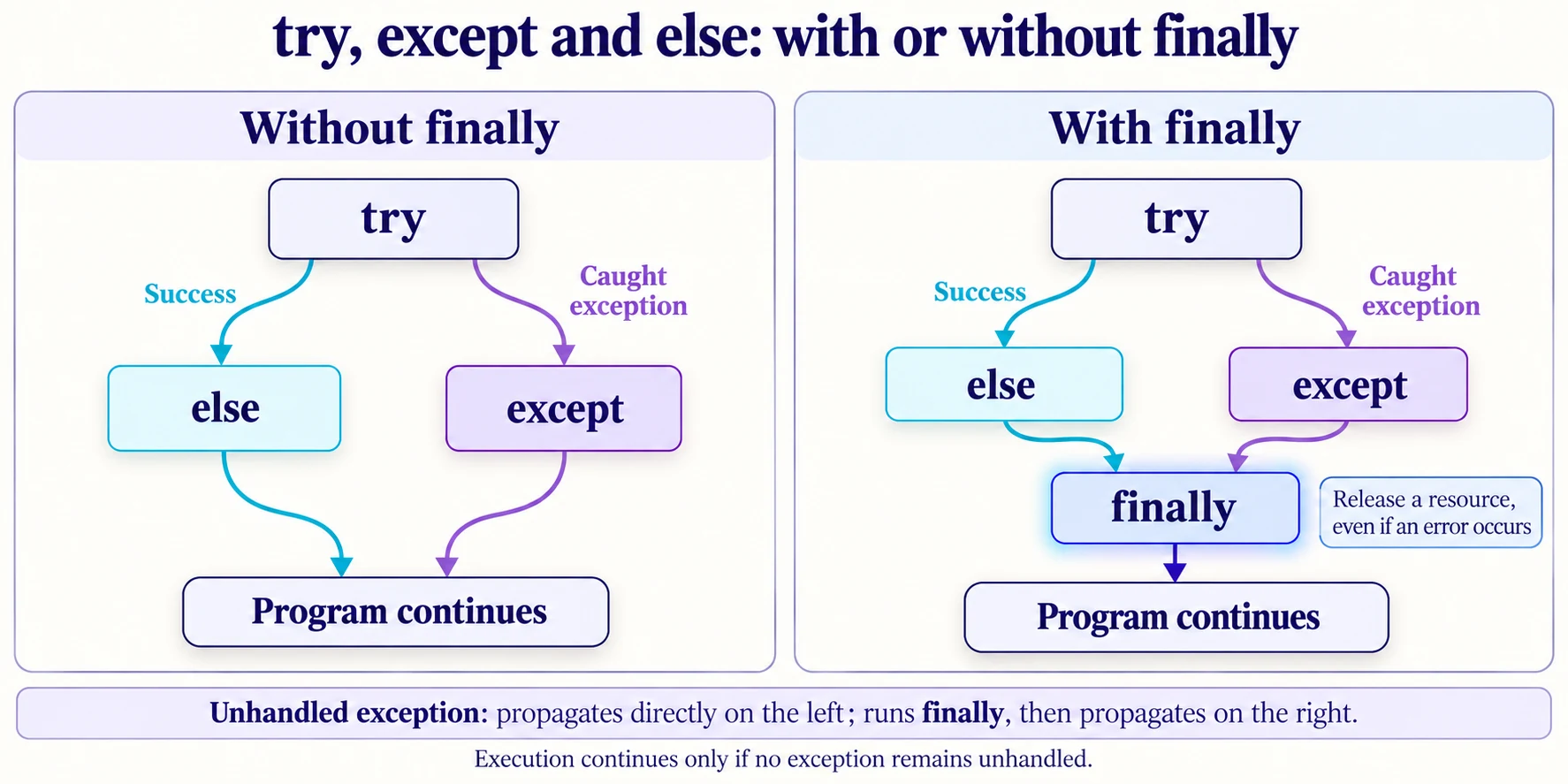
When should you use finally? Add this clause when a resource must be released as the block is left, even if an error occurs: closing a connection or releasing a lock, for example. A simple conversion with int needs no cleanup; try, except and else are enough. For files, generally prefer with, which closes the file automatically. The Python documentation on cleanup actions explains the role of finally.
Identify an exception when its type is not yet known
If you do not yet know the error type, you can temporarily use except Exception as erreur to identify it in this small example. Exception is a common base class for most ordinary exceptions, including ValueError and TypeError. This handler can therefore catch exceptions of several types. It does not cover every exception: KeyboardInterrupt and SystemExit do not inherit from it.
Use the same inputs again, this time also printing the exception type. The try block still contains only the conversion.
for saisie in ["19", "nineteen"]:
    try:
        heures = int(saisie)
    except Exception as erreur:
        print("Input rejected:", saisie)
        print("Type:", type(erreur).__name__)
        print("Details:", erreur)
    else:
print("Hours accepted:", heures)Hours accepted: 19
Input rejected: nineteen
Type: ValueError
Details: invalid literal for int() with base 10: 'nineteen'as erreur gives access to the exception object. type(erreur) returns its class, and .__name__ gives the name of that class: here, ValueError. Printing erreur displays the message explaining the cause.
With "19", conversion succeeds and else prints the accepted value. With "nineteen", conversion fails: the handler prints the rejected input, the type ValueError and its message.
Once you have identified the type, prefer except ValueError as erreur to handle the expected error precisely, as in the previous example. Keeping except Exception could also catch a programming error you had not intended to handle. This broad form is used here for diagnosis; it should not hide an unexpected error.
Reject invalid values and understand finally
Raise an exception with raise
A successful conversion does not guarantee that a study duration is valid. The value -1 is an integer, but a study duration cannot be negative. raise lets you reject it explicitly with a precise message.
heures = -1
if heures < 0:
    raise ValueError("Hours_Studied must be nonnegative.")
print("Hours accepted:", heures)---------------------------------------------------------------------------
ValueError Traceback (most recent call last)
Cell In[6], line 3
1 heures = -1
2 if heures < 0:
----> 3 raise ValueError("Hours_Studied must be nonnegative.")
4 print("Hours accepted:", heures)
ValueError: Hours_Studied must be nonnegative.This second error is intentional. The message identifies the field and the rule being checked: the duration must be nonnegative. Try again with 19, a value from our extract:
heures = 19
if heures < 0:
    raise ValueError("Hours_Studied must be nonnegative.")
print("Hours accepted:", heures)Hours accepted: 19See when finally runs
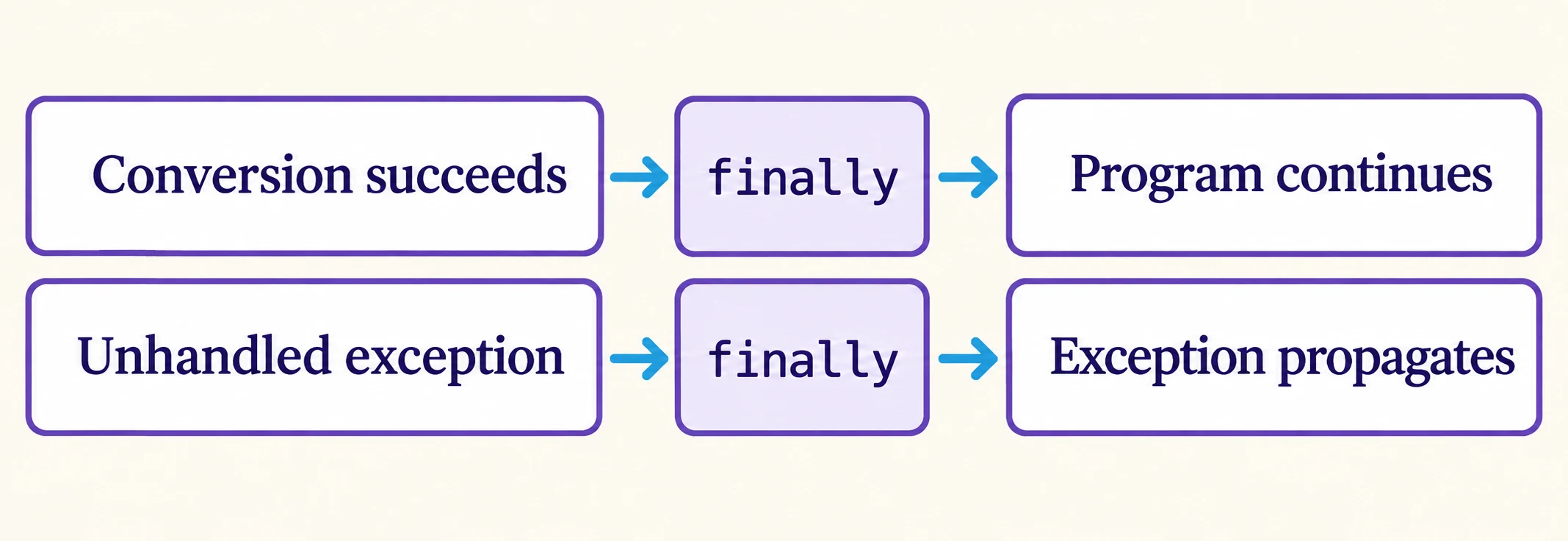
The finally clause runs an action before leaving the try statement, whether an exception has been handled or still needs to propagate. The following example makes the execution order visible:
for saisie in ["19", "nineteen"]:
    try:
        heures = int(saisie)
    except ValueError:
        print("Conversion failed.")
    else:
        print("Hours accepted:", heures)
    finally:
print("Check finished.")Hours accepted: 19
Check finished.
Conversion failed.
Check finished.The final message appears for both inputs. It does not mean that conversion succeeded. Here, printing the message helps you observe the execution order. Do not use return in finally to suppress an error: it can replace the result or prevent an exception from propagating.
If the finally block finishes normally, any exception that has not been handled continues to propagate. Execution does not automatically resume after the try statement. When handling Python exceptions, a final message means neither “valid data” nor “error handled.” The diagram below assumes that the finally block finishes normally, without changing the exit path.
Exercise: reject input without distorting the mean
The three values from the extract now arrive as text: "23", "19" and "24". Add "to check" to test invalid input. Write code that converts the strings and rejects negative durations. It should print the mean only if every input is valid and the list contains at least one value.
Check three cases: the list containing invalid input, the three valid strings and an empty list. Rejected input must neither become zero nor silently disappear from the calculation.
Show the solution and verified outputs
for saisies in [
    ["23", "19", "24", "to check"],
    ["23", "19", "24"],
    [],
]:
    heures_valides = []
    saisies_refusees = []
    for saisie in saisies:
        try:
            heures = int(saisie)
            if heures < 0:
                raise ValueError("Negative duration.")
        except ValueError:
            saisies_refusees.append(saisie)
        else:
            heures_valides.append(heures)

    if saisies_refusees:
        print("Calculation suspended. Rejected inputs:", saisies_refusees)
    elif not heures_valides:
        print("Calculation suspended. No values.")
    else:
        moyenne = sum(heures_valides) / len(heures_valides)
print("Mean study hours:", moyenne)Calculation suspended. Rejected inputs: ['to check']
Mean study hours: 22.0
Calculation suspended. No values.The first case suspends the calculation and retains the input that needs checking. The second produces 22.0. The third avoids division by zero by reporting that there are no values. The saisies_refusees list identifies the inputs to correct before calculating the mean.
The expected inputs here are strings. If another component passes None instead, conversion raises TypeError; that unexpected case remains visible. Supporting it would require specifying the accepted input types and how each should be handled.
When the program keeps running but is still wrong
- An old result appears after an error. If the calculation on the right of
=fails, assignment does not take place. The variable keeps its old value if it was already defined. Redefine the inputs and recalculate in order. - An error is replaced with zero. The calculation may complete, but the mean then depends on an invented value. Reject the input or apply an explicitly justified data-processing rule.
- The same message appears after a correction. Check that you ran the edited cell, then check its dependencies. Saved code and the state of the kernel are two different things.
- A file or module still cannot be found. A handler does not create the file or install the package. Correct the path, name or environment before trying again.
Key takeaways
A traceback gives you a starting point for diagnosis. Read the exception type and message, find the line that ran, then check the inputs. Fix programming errors and reserve handlers for situations with a defined response. After making changes, check the result too: the absence of an exception does not prove that a calculation is correct.
