Write reusable Python functions
A Python function is a named block of code that you can call to perform a task without rewriting the same instructions. It can receive input data and return a result.
To write reusable Python functions, define an operation with def, supply input values as arguments and return the result with return. Then specify which inputs it accepts and check a few meaningful cases. You can call the same calculation with new values without copying its instructions into every cell.
Download the Python functions notebook (ZIP). Extract FonctionsReutilisables.ipynb, open it in VS Code and select your .venv kernel. Run the cells in order to reproduce the examples and the exercise solution.
Contents
Define reusable Python functions with def and return
A function groups instructions under a name that you can call. Its definition declares its parameters; its body contains the instructions to execute. Here, the function calculates the arithmetic mean of a non-empty list of numbers: their sum divided by their count. The list below contains the first three values of Hours_Studied, measured in hours per week, from StudentPerformanceFactors.xlsx. The Python documentation on defining functions explains this syntax.
# Use the first three study durations from the workbook.
initial_hours = [23, 19, 24]

def calculate_average(values):
    total = sum(values)
    return total / len(values)

# Store the result so it can be reused.
initial_mean = calculate_average(initial_hours)
print(initial_mean)22.0def calculate_average(values): defines the function. The name values is the parameter; the indented instructions form the body. Defining the function does not calculate a mean. The call calculate_average(initial_hours) executes those instructions with the supplied list.
sum(values) produces 66 and len(values) produces 3. The return statement ends this call and returns 22.0. The assignment stores that result in initial_mean, then print displays it. The calculation can therefore feed another operation, even without displaying anything.
![Python functions: calculate_average receives [23, 19, 24] through values and returns 22.0 to the caller.](https://mlwebapp.com/wp-content/uploads/2026/10/reusable-python-functions-input-return-en-revised-2026-10-21-calculate-average.webp)
return makes the result available to the rest of the program.Call Python functions with different arguments
A parameter is a name declared in the function definition; an argument is a value supplied in a call. In calculate_average(initial_hours), the list referred to by initial_hours is the argument associated with the parameter values. The Python glossary explains this distinction.
Now take the first eight data rows of the Excel workbook. The list hours contains their weekly study hours from Hours_Studied; attendance contains the values of Attendance, the percentage of classes attended. The two lists describe different quantities. We can apply the same mean calculation to both while keeping their units in the displayed output.
# Extend the extract to the first eight data rows of the workbook.
hours = [23, 19, 24, 29, 19, 19, 29, 25]
attendance = [84, 64, 98, 89, 92, 88, 84, 78]

def rounded_mean(values, ndigits=2):
    return round(calculate_average(values), ndigits)

# Change the data without rewriting the calculation.
print("Study hours:", rounded_mean(hours))
print("Attendance (%):", rounded_mean(attendance, ndigits=1))
print("Hours, to one decimal place:", rounded_mean(hours, ndigits=1))Study hours: 23.38
Attendance (%): 84.6
Hours, to one decimal place: 23.4The function rounded_mean calls calculate_average, then rounds its result. The parameter ndigits defaults to 2, so the call with the study hours returns 23.38. In rounded_mean(attendance, ndigits=1), the keyword argument sets ndigits to 1 instead of its default value. The function then returns 84.6.
The third output, 23.4, shows the same study-hour mean rounded to one decimal place. The unrounded mean of the eight durations is 23.375.
| Concept | In the definition | In the call |
|---|---|---|
| Data to process | values | hours or attendance |
| Calculation option | ndigits=2 | ndigits=1 for different rounding |
| Return value | return round(...) | A number the caller can store |
Understand local scope in Python functions
The scope of a name is the part of the program where that name is accessible. The parameters and variables assigned in a function like this one are local to its call. They can have the same name as an outer variable without replacing it.
# Use the same name for an outer variable to compare the two.
total = 999

def local_mean(values):
    total = sum(values)
    return total / len(values)

# Check that the outer total has kept its value.
print("Mean:", local_mean(hours))
print("Outer total:", total)Mean: 23.375
Outer total: 999The total used for the sum is local to local_mean. The notebook’s total still equals 999 after the call. This local assignment does not change the outer variable. The Python reference on name resolution describes the scope rules.
Local scope does not mean that Python copies the objects it receives. A parameter can refer to the same list as the caller’s argument. If the function appends an item or sorts that list in place, the change remains visible outside the function. Our mean calculation reads the list without changing it. The lesson on mutability and copies explores this distinction further.
Distinguish displayed output from a return value
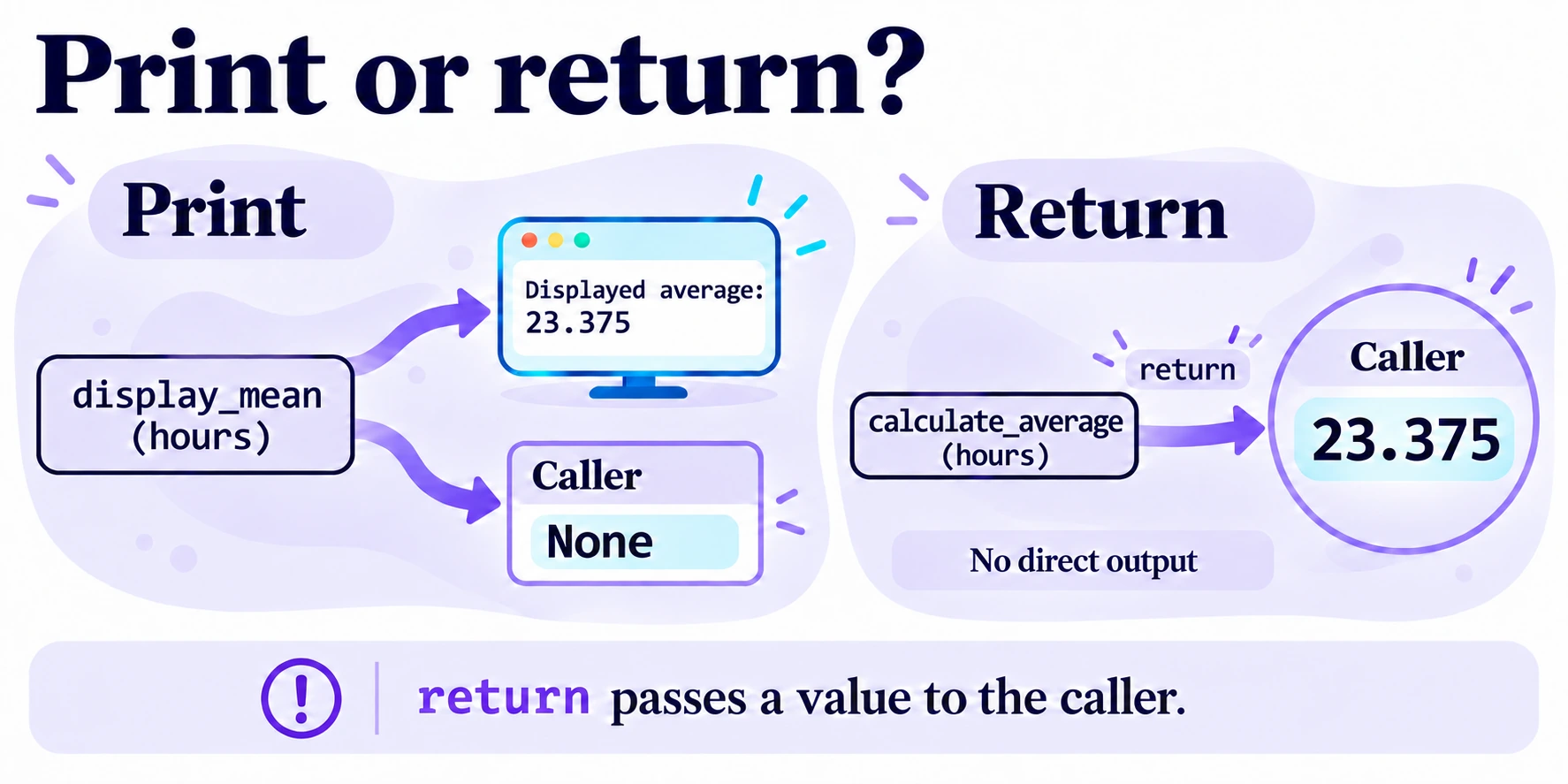
A function that displays a number does not automatically return that number to its caller. Compare two behaviors using the same study hours:
def display_mean(values):
    print("Displayed average:", calculate_average(values))

# Observe what the caller receives after simply displaying a value.
displayed_result = display_mean(hours)
print("Received value:", displayed_result)

# Store the number returned by the calculation instead.
calculated_result = calculate_average(hours)
print("Calculated value:", calculated_result)Displayed average: 23.375
Received value: None
Calculated value: 23.375display_mean does display 23.375, but its body reaches the end without a return statement. The value received in displayed_result is therefore None. Here, it represents the absence of a returned numeric result. It is neither a mean of zero nor an empty list.
By contrast, calculate_average(hours) returns the number 23.375, which can be stored, compared or passed to another function. The reference for the return statement explains how a function returns.
For a reusable calculation, generally return the result and let the calling code choose how to present it. A notebook can display it with print; a future application can put it in its interface. A function whose specific purpose is to display a message can end without returning a useful value.
Document Python functions and validate their inputs
A function’s contract describes what it accepts, what it returns and which errors it raises. Return to the previous lesson’s example: study hours arrive as strings. The function expects a string representing a non-negative integer and returns that integer. It rejects inputs of another type, strings that do not represent an integer and negative values.
def parse_hours(text: str) -> int:
    """Convert a string to a non-negative integer number of hours.

    Raise TypeError if the input is not a string, or ValueError if
    it does not represent a non-negative integer.
    """
    # Check the type before attempting conversion.
    if not isinstance(text, str):
        raise TypeError("The value must be a string.")
    try:
        hours = int(text)
    except ValueError:
        raise ValueError("Enter an integer, for example '23'.") from None
    # Reject a value that does not meet the stated contract.
    if hours < 0:
        raise ValueError("The number of hours must be non-negative.")
    return hours

print(parse_hours("23"))
print(parse_hours(" 19 "))23
19A string literal used as the first statement in the function body is a docstring, the function’s documentation string. Here, it explains the result and which inputs the function rejects. The type annotations text: str and -> int indicate a string input and an integer output. They do not perform runtime validation by themselves. The instructions in the body enforce the checks.
isinstance(text, str) checks the input’s type before conversion. int accepts the surrounding spaces in " 19 " and returns 19. If conversion fails, we raise a ValueError with a message suited to user input. from None hides the original conversion exception in the displayed traceback if the new exception is not caught. The new ValueError is still raised and can be handled by the calling code.
Finally, the condition hours < 0 rejects negative study durations. Accepting 0 is a choice in this function’s contract. These checks validate the input type and integer format and reject negative values.
# Handle each error near the call without stopping the notebook.
for input_value in [23, "-1", "19.5", ""]:
    try:
        parse_hours(input_value)
    except (TypeError, ValueError) as error:
print(type(error).__name__ + ":", error)TypeError: The value must be a string.
ValueError: The number of hours must be non-negative.
ValueError: Enter an integer, for example '23'.
ValueError: Enter an integer, for example '23'.The integer 23 is rejected with TypeError because the function expects a string. The strings "-1", "19.5" and "" are rejected with ValueError: they do not represent a non-negative integer. The except clause handles these errors so the notebook can continue with the examples. The function never replaces an invalid input with zero.
Compose Python functions to prepare data and calculate a result
Reject an empty list before calculating the mean
The first version of calculate_average divided the sum directly by the number of values. For an empty list, that count is zero. Add an explicit check before the division:
def calculate_average(values):
    # Check for an empty list before dividing.
    if len(values) == 0:
        raise ValueError("The list must not be empty.")
    return sum(values) / len(values)

print(calculate_average(initial_hours))
try:
    calculate_average([])
except ValueError as error:
print("ValueError:", error)22.0
ValueError: The list must not be empty.This cell replaces the previous definition of calculate_average. A non-empty list of numbers is still the expected input; an empty list now raises a ValueError with a specific message. Returning 0 would be misleading: no mean has been calculated. In this notebook, rounded_mean will use this new definition on subsequent calls.
Build a new list without changing the input strings
Converting a single input and preparing a list are separate tasks. The following function loops through the strings, calls parse_hours for each one and returns a new list of integers:
def prepare_hours(texts):
    # Build a new list without changing the input list.
    values = []
    for text in texts:
        values.append(parse_hours(text))
    return values

inputs = ["23", "19", "24"]
print(prepare_hours(inputs))
print(inputs)[23, 19, 24]
['23', '19', '24']The first output contains the numbers; the second still contains the original strings. A new local list, values, is created on each call. If an input is rejected, the exception interrupts that call and no partial list is returned. This choice avoids silently calculating a mean over fewer observations than expected.
Combine the functions to process new inputs
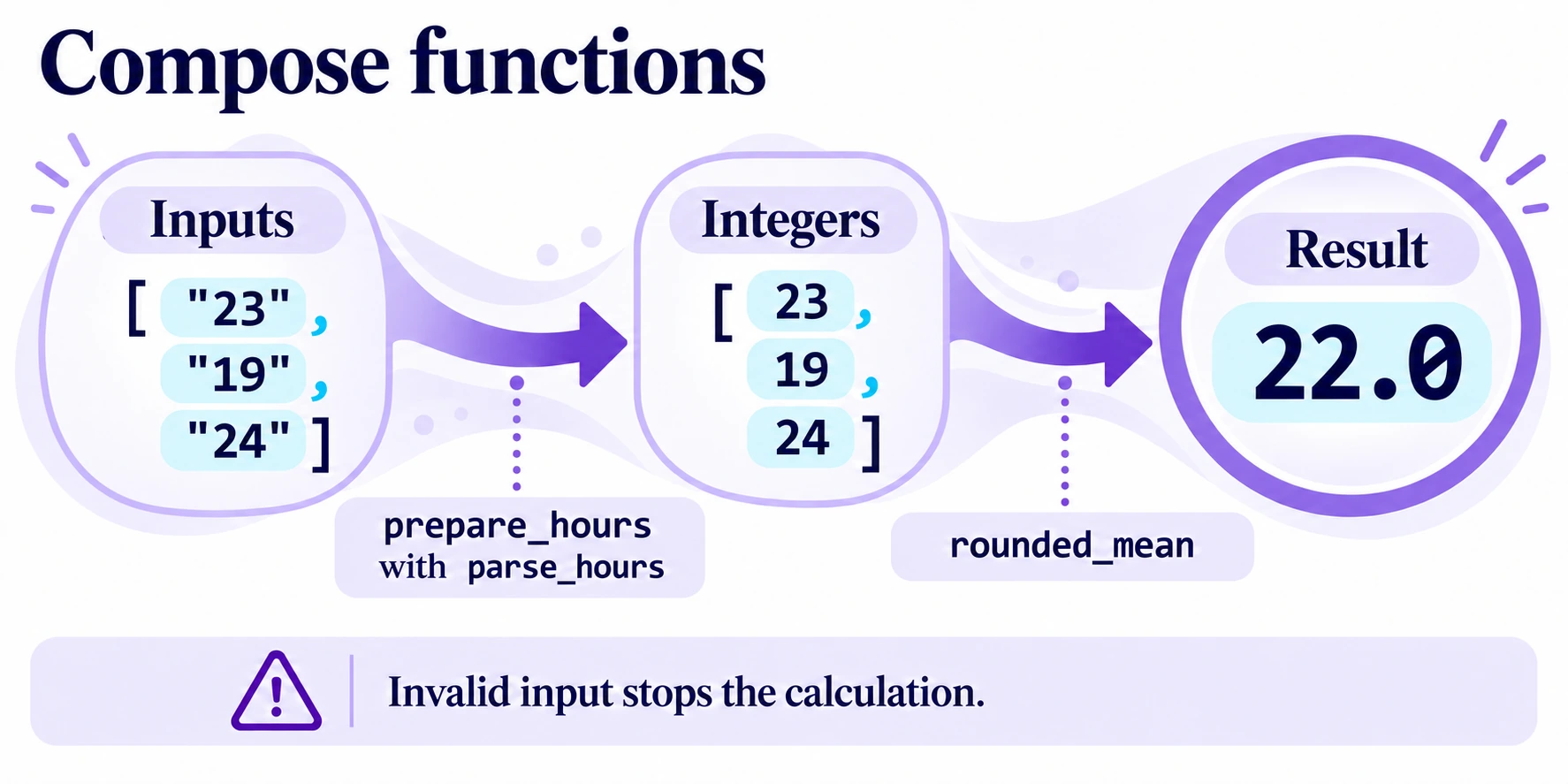
Here, composition means using one function’s result in the next. We need to prepare the input strings, then calculate their rounded mean:
def mean_from_hour_inputs(texts, ndigits=2):
    # Prepare the input strings before reusing the calculation.
    values = prepare_hours(texts)
    return rounded_mean(values, ndigits=ndigits)

# Repeat the same processing on two groups from the same extract.
print(mean_from_hour_inputs(["23", "19", "24"]))
print(mean_from_hour_inputs(["29", "19", "19", "29", "25"]))22.0
24.2The first call uses the first three study durations and returns 22.0. The second uses the next five, 29, 19, 19, 29 and 25, and returns 24.2. The data changes; the conversion and calculation rules stay the same.
These Python functions each have a distinct role: parse_hours converts and validates one input, prepare_hours builds a list, calculate_average calculates the mean and rejects an empty list, and rounded_mean rounds the result. mean_from_hour_inputs connects them. This decomposition lets you change a rule without rewriting the entire process.
Test Python functions and check expected errors
A test compares the observed behavior with the expected behavior. The previous calls display the results; a few assertions let us check that those results remain correct after a change.
# Check the results and preservation of the original strings.
assert calculate_average(initial_hours) == 22.0
assert rounded_mean(hours) == 23.38
assert parse_hours(" 0 ") == 0
assert prepare_hours(["23", "19", "24"]) == [23, 19, 24]
assert mean_from_hour_inputs(["23", "19", "24"]) == 22.0
assert inputs == ["23", "19", "24"]

# Check that the composed function propagates the expected errors.
try:
    mean_from_hour_inputs([])
except ValueError as error:
    assert str(error) == "The list must not be empty."
else:
    raise AssertionError("The empty list should have been rejected.")

try:
    mean_from_hour_inputs(["23", "-1"])
except ValueError as error:
    assert str(error) == "The number of hours must be non-negative."
else:
    raise AssertionError("The negative value should have been rejected.")

try:
    mean_from_hour_inputs(["23", "19.5"])
except ValueError as error:
    assert str(error) == "Enter an integer, for example '23'."
else:
    raise AssertionError("The decimal input should have been rejected.")

print("Tests passed.")Tests passed.assert raises an AssertionError if the condition is false. With assertions enabled, the message “Tests passed.” appears only after all the preceding checks pass. The try blocks check that an empty list, a negative value and a decimal input are rejected. Each else branch raises an AssertionError if the expected exception does not occur.
Exercise: count values that reach a threshold
Write a function count_at_least(values, threshold) that receives a list of numbers and returns the number of elements greater than or equal to the threshold. It must return 0 for an empty list and leave the input list unchanged. Do not display anything inside the function.
# Prepare the data and threshold to use in your function.
exercise_hours = [23, 19, 24, 29, 19, 19, 29, 25]
exercise_threshold = 24
print(exercise_hours)
print("Threshold in hours per week:", exercise_threshold)[23, 19, 24, 29, 19, 19, 29, 25]
Threshold in hours per week: 24For these eight study durations, the result should be 4 with a threshold of 24. Also check [23, 24, 25] with the same threshold: the result should be 2, because a value equal to the threshold counts. This threshold is used only to count study durations in the extract; it does not define a success category.
Show the solution and its checks
def count_at_least(values, threshold):
    # Count without changing the original values.
    count = 0
    for value in values:
        if value >= threshold:
            count += 1
    return count

# Also check an empty list and a value exactly at the threshold.
assert count_at_least(exercise_hours, 24) == 4
assert count_at_least([], 24) == 0
assert count_at_least([23, 24, 25], 24) == 2

print(count_at_least(exercise_hours, exercise_threshold))
print("Solution tests passed.")4
Solution tests passed.The counter starts at zero on each call. The loop adds 1 to it when value >= threshold. The return comes after the loop, so every element has been examined before the total is returned. For an empty list, the loop runs no iterations and the counter stays at zero.
Fix common mistakes in Python functions
- A number is displayed, but the variable contains
None. Check that areturnstatement returns the result on the path being executed. Displaying it withprintis not enough. - Counting stops at the first element. A
returninside the loop immediately ends the call. - The function still uses an old list. Check that it reads its parameter rather than an outer variable. Then restart the kernel and run the cells in order.
- A list changes after the call. Check whether the function modifies the list, for example by appending an item or sorting it in place. Decide explicitly whether the function should change its input or produce a new object.
- A call raises a
TypeError. Check that the number of arguments and any keyword argument names match the function definition.parse_hoursalso raisesTypeErrordeliberately if you pass an integer instead of a string.
Key points
Reusable Python functions expose the data and options they need through their parameters, return usable results and state the conditions for using them. Their docstrings explain these contracts; checks and tests verify that they are followed. You have now separated input preparation, calculation and display while preserving the original data.
