Python comprehensions, enumerate and zip: transform collections

Python comprehensions build lists, dictionaries and sets from existing data. They specify the values to produce, the items to iterate over and, optionally, a condition for keeping an item. A list comprehension can replace a loop that builds a list one item at a time. Use enumerate to number items as you iterate, and zip to process values from corresponding columns together.
This lesson starts with a familiar loop and rewrites it as a comprehension. You will learn when to filter an item out and when to choose a value for it, how to keep two lists aligned, and how to combine these tools in a reusable function.
Before you begin. You should be familiar with lists, dictionaries, conditions and the for loop covered in Python basics. Open the notebook in VS Code and select the kernel for your .venv environment. The examples were run with Python 3.14.8; zip(..., strict=True) requires Python 3.10 or later. No additional libraries are used.
Download the notebook and its worked exercise. The archive contains ComprehensionsEnumerateZip.ipynb and a short guide. Extract it, open the notebook in VS Code and choose “Run All”. The example data are included, so you do not need to load a workbook. If the kernel is unavailable, revisit the Python, VS Code and Jupyter setup guide.
Contents
From loops to Python comprehensions
A list comprehension is an expression that creates a new list. It combines a for clause with an expression for each new item and, optionally, a condition that filters items out. The Python documentation on comprehensions describes the syntax.
For these transformations, we will use the first eight observations from Student Performance Factors. Hours_Studied gives the number of study hours per week; Attendance gives the percentage of classes attended. Both columns retain their original order.
| Position in this subset | Hours_Studied | Attendance |
|---|---|---|
| 1 | 23 | 84 |
| 2 | 19 | 64 |
| 3 | 24 | 98 |
| 4 | 29 | 89 |
| 5 | 19 | 92 |
| 6 | 19 | 88 |
| 7 | 29 | 84 |
| 8 | 25 | 78 |
# Reuse the first eight observations in their original order.
study_hours = [23, 19, 24, 29, 19, 19, 29, 25]
attendance_rates = [84, 64, 98, 89, 92, 88, 84, 78]

print(study_hours)
print(attendance_rates)[23, 19, 24, 29, 19, 19, 29, 25]
[84, 64, 98, 89, 92, 88, 84, 78]The first study-hour value and the first attendance value describe the same observation: 23 hours and 84% attendance. The position numbers label the eight observations shown here, starting at 1. They exclude the header row and are not student identifiers.
Start with an explicit transformation
To convert hours to minutes, create an empty list, loop over the study-hour values and append each value multiplied by 60. This separates the three steps so you can follow them one at a time.
# Build a new list without changing the original durations.
minutes_loop = []
for hours in study_hours:
    minutes_loop.append(hours * 60)

print(minutes_loop)[1380, 1140, 1440, 1740, 1140, 1140, 1740, 1500]The new list contains eight values in minutes, in the original order. Repeated values remain: each of the three occurrences of 19 hours gives 1140 minutes, and each of the two occurrences of 29 hours gives 1740 minutes. The conversion leaves study_hours unchanged.
Replace the loop with a list comprehension
The comprehension builds the same result in a single expression. In [hours * 60 for hours in study_hours], for hours in study_hours supplies each study-hour value, and hours * 60 calculates the value to add to the new list.
# Express the transformation directly when building the list.
minutes = [hours * 60 for hours in study_hours]

print(minutes)
print(minutes == minutes_loop)
print(study_hours)[1380, 1140, 1440, 1740, 1140, 1140, 1740, 1500]
True
[23, 19, 24, 29, 19, 19, 29, 25]The comparison returns True, confirming that the two lists contain the same values in the same order. Python comprehensions work well for short transformations like this one. When each iteration needs several checks or exception handling, an explicit loop may be easier to read and debug.
Filter a list or choose a value for each item
An if after the iteration clause selects the items to keep. We will use a threshold of 20 hours to see how this works. The three occurrences of 19 hours are excluded. The five retained durations, 23, 24, 29, 29 and 25 hours, are then converted to minutes.
# Keep the five durations of at least 20 hours, then convert them.
selected_minutes = [h * 60 for h in study_hours if h >= 20]

print(selected_minutes)[1380, 1440, 1740, 1740, 1500]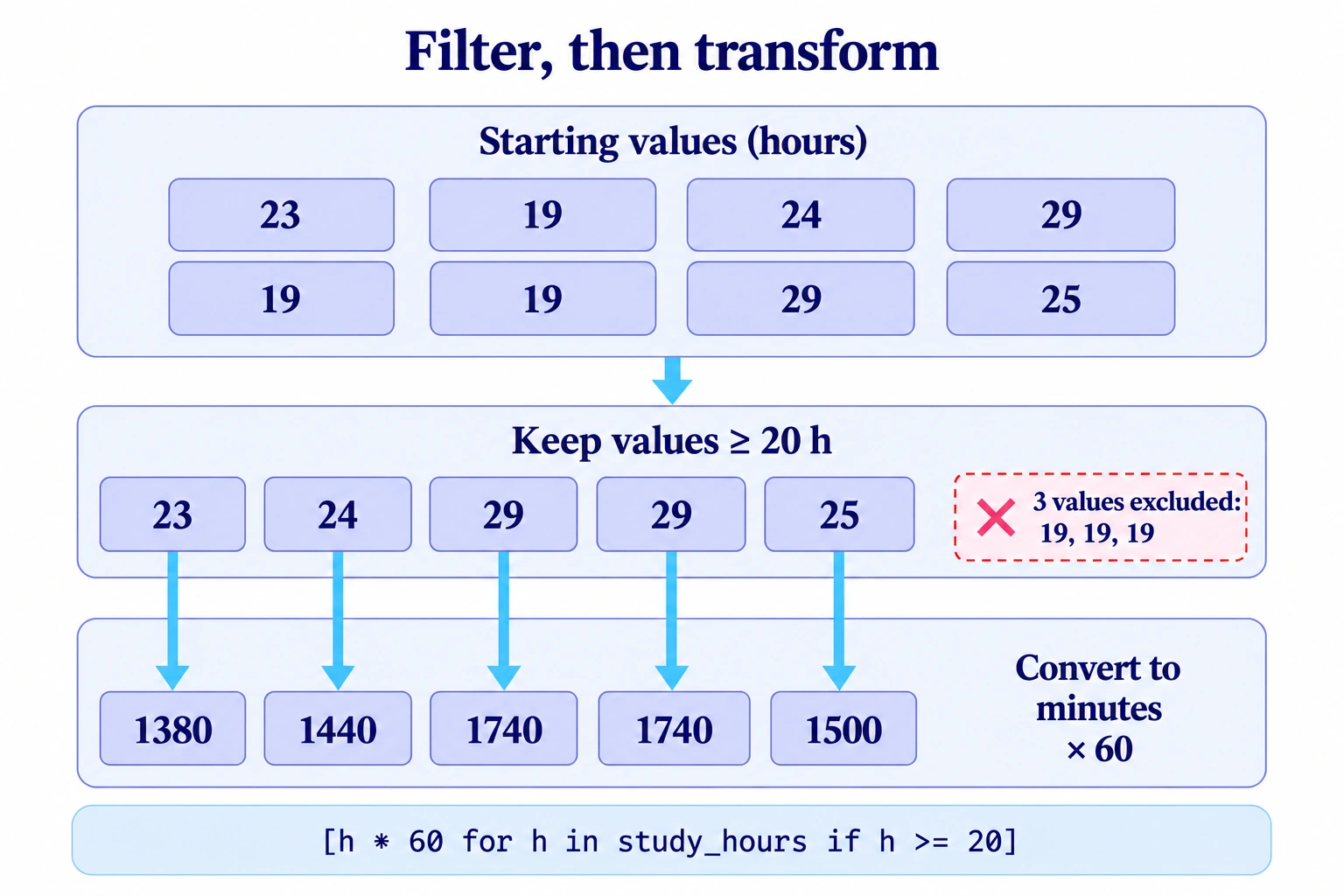
Here, h takes each value from the list. Python checks h >= 20 before evaluating h * 60 for that item. The five retained values therefore appear in their original order.
Distinguish a filter from a conditional expression
You can also keep every item and choose a label for it based on a condition. Here, if ... else is part of the expression that produces each value, so it appears before the for clause.
# Assign a label to each of the eight durations.
duration_labels = [
    "20 h or more" if h >= 20 else "less than 20 h"
    for h in study_hours
]

print(duration_labels)['20 h or more', 'less than 20 h', '20 h or more', '20 h or more', 'less than 20 h', 'less than 20 h', '20 h or more', '20 h or more']This list contains eight labels, one for each original study-hour value. The filter after the for clause answers “Should this item be kept?” The conditional expression before it answers “Which value should be produced for this item?” That is why if appears in different places in the two forms.
Number items with enumerate
The built-in enumerate function adds a counter as you iterate over an iterable, an object whose items you can loop over with for. A list is one example. Each iteration yields a (counter, value) pair as a tuple, an immutable sequence of values. The loop pattern for position, hours in ... unpacks that pair into two variables. Passing start=1 makes the counter begin at 1. See the definition of enumerate.
# Number the positions in the extract starting at 1.
for position, hours in enumerate(study_hours, start=1):
print(f"Observation {position}: {hours} h")Observation 1: 23 h
Observation 2: 19 h
Observation 3: 24 h
Observation 4: 29 h
Observation 5: 19 h
Observation 6: 19 h
Observation 7: 29 h
Observation 8: 25 hThere is no need to update a separate counter or look up each item with study_hours[index]. The loop receives the counter and the study-hour value together.
If you omit start, the counter begins at zero. Because this example iterates over the whole list in its original order, the counters also match the list indices. Displaying the pairs makes that correspondence visible.
# Display the (counter, value) pairs starting at zero.
print(list(enumerate(study_hours)))
print(study_hours[0])[(0, 23), (1, 19), (2, 24), (3, 29), (4, 19), (5, 19), (6, 29), (7, 25)]
23Changing the counter’s starting value does not change list indexing: study_hours[0] is still 23, even when the output says “Observation 1”. Python comprehensions can use these pairs when the result needs to retain a position number.

(1, 23); access by index remains study_hours[0]. · View the full-size diagramPair values from several columns with zip
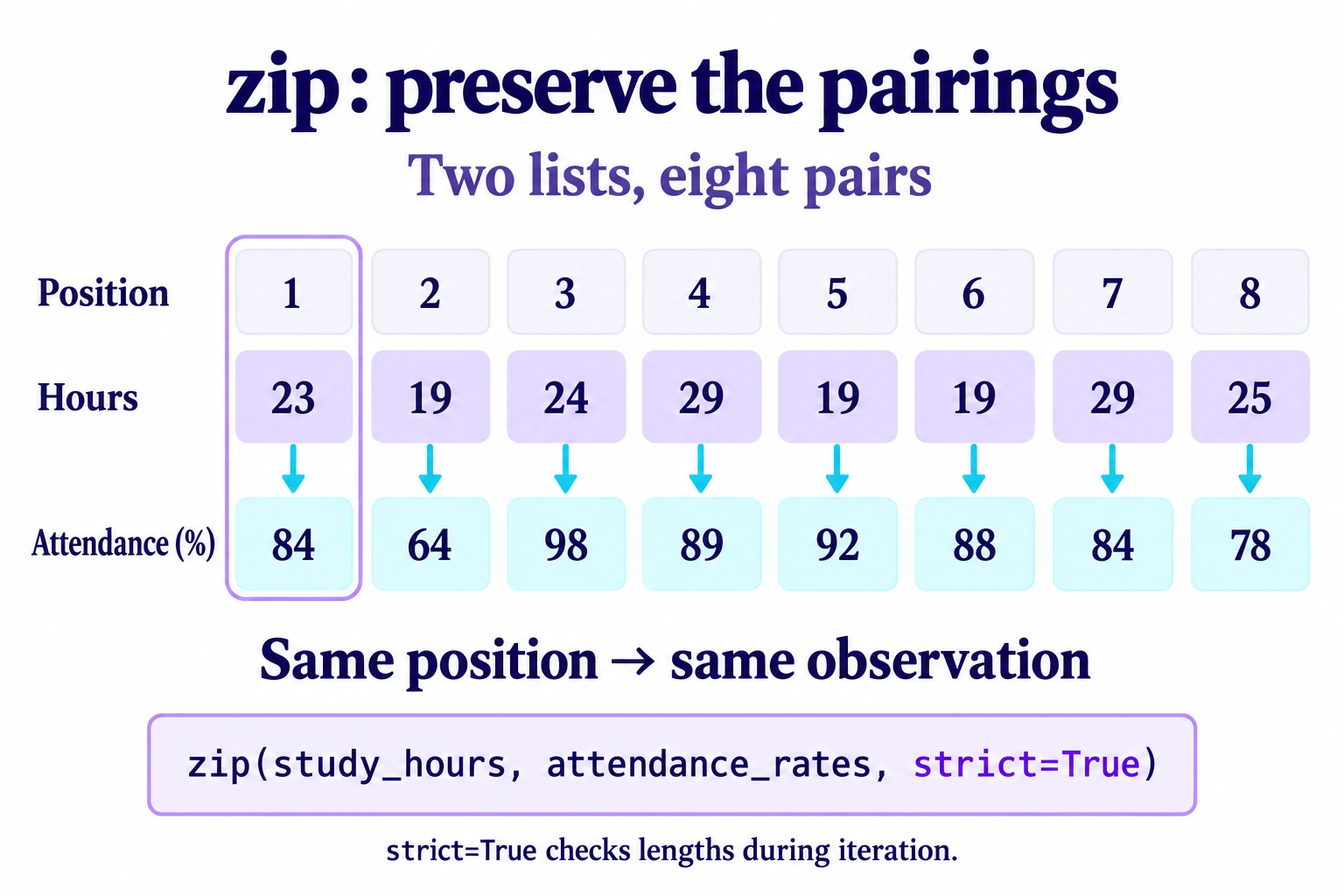
zip iterates over several iterables in parallel, yielding a tuple with one value from each at the same position. Here, it pairs study hours with the corresponding attendance rate. The loop unpacks each pair directly; there is no need to build an intermediate list first. The zip documentation explains this behaviour.
# Pair the duration and attendance for the same observation.
for hours, attendance in zip(study_hours, attendance_rates, strict=True):
print(f"{hours} h; attendance: {attendance}%")23 h; attendance: 84%
19 h; attendance: 64%
24 h; attendance: 98%
29 h; attendance: 89%
19 h; attendance: 92%
19 h; attendance: 88%
29 h; attendance: 84%
25 h; attendance: 78%All eight pairs match the table. In particular, the three occurrences of 19 hours correspond to different attendance rates: 64, 92 and 88%. The study-hour value alone cannot identify the observation; its position also matters. zip pairs values by position. It does not match records by an identifier or sort the data.
Check lengths with strict=True
By default, zip stops when the shortest iterable is exhausted. That can be useful, but it can also hide an incomplete column. When two columns are meant to describe the same observations, use strict=True to require equal lengths. This option was introduced in Python 3.10, as explained in PEP 618.
In the next block, the [:-1] slice removes only the last attendance value to make the problem visible. The first output contains only seven pairs: the final observation, (25, 78), is missing. The second iteration reports the difference in length.
# Remove the last attendance value only to demonstrate the check.
incomplete_attendance = attendance_rates[:-1]
print(list(zip(study_hours, incomplete_attendance)))

# Report the length difference rather than lose an observation.
try:
    list(zip(study_hours, incomplete_attendance, strict=True))
except ValueError as error:
print(f"{type(error).__name__}: {error}")[(23, 84), (19, 64), (24, 98), (29, 89), (19, 92), (19, 88), (29, 84)]
ValueError: zip() argument 2 is shorter than argument 1The length check happens as the iterator is consumed. Creating zip(..., strict=True) alone does not raise a ValueError. In this example, list() consumes the entire iterator, so it reaches the mismatch. A loop that stops early may never reach that point.
Store a result if you need to read it again
zip and enumerate return iterators, which provide values one at a time as you iterate. They do not build a complete list themselves. Once an iterator is exhausted, it does not restart. Converting that same iterator to a list again therefore produces an empty list.
# Consume the same iterator twice.
pairs = zip(study_hours, attendance_rates, strict=True)
print(list(pairs))
print(list(pairs))[(23, 84), (19, 64), (24, 98), (29, 89), (19, 92), (19, 88), (29, 84), (25, 78)]
[]If you need to loop over the pairs more than once, store list(zip(study_hours, attendance_rates, strict=True)) and reuse the resulting list. Because the original inputs are lists, you can also make a fresh zip call for each pass. For a single pass, iterate over zip directly.
Build a dictionary or a set with a comprehension
Python comprehensions are not limited to lists. In a dictionary comprehension, braces enclose a key: value expression followed by the iteration clause. For our conversion, we can use the position as the key and the duration in minutes as the value.
# Associate each position number with its duration in minutes.
minutes_by_position = {
    position: hours * 60
    for position, hours in enumerate(study_hours, start=1)
}

print(minutes_by_position){1: 1380, 2: 1140, 3: 1440, 4: 1740, 5: 1140, 6: 1140, 7: 1740, 8: 1500}Key 2 is associated with 1140 minutes. The counter produces a distinct key for each observation. If a dictionary comprehension produces the same key more than once, the last value for that key wins; it does not group the earlier values under that key.
In a set comprehension, an expression followed by the iteration clause is enclosed in braces, without a key-value pair. Each distinct value is kept only once. The first eight Access_to_Resources values contain five occurrences of Medium, two of High and one of Low. We keep these labels exactly as they appear in the data.
# Reuse the first eight resource access levels.
resource_access = [
    "High", "Medium", "Medium", "Medium",
    "Medium", "Medium", "Low", "High",
]
distinct_levels = {level for level in resource_access}

print(sorted(distinct_levels))['High', 'Low', 'Medium']This comprehension creates a set containing the three distinct labels: "High", "Medium" and "Low".
A set keeps each distinct value only once, and its iteration order is not guaranteed. sorted() returns a sorted list, making this output predictable. Remember that {} creates an empty dictionary; use set() for an empty set. Choose a list when order and repetitions matter, a dictionary for key-value mappings and a set for distinct values.
Combine enumerate and zip while preserving the original position
You can now read a position number and values from two columns in the same loop. zip yields an (hours, attendance) pair, and enumerate adds a counter to that pair. The loop pattern unpacks the counter into position and the inner pair into hours and attendance.
# Read the number, duration and attendance in the same loop.
for position, (hours, attendance) in enumerate(
    zip(study_hours, attendance_rates, strict=True), start=1
):
print(f"{position}: {hours} h; {attendance}%")1: 23 h; 84%
2: 19 h; 64%
3: 24 h; 98%
4: 29 h; 89%
5: 19 h; 92%
6: 19 h; 88%
7: 29 h; 84%
8: 25 h; 78%The order of these operations matters in the exercise. To keep the original position numbers after filtering, enumerate the original pairs before applying the filter. Numbering an already filtered list would label positions in the shorter list instead.
Exercise: prepare observations with Python comprehensions
Reuse the same eight observations in their original order. Write a function prepare_observations(hours, attendance_rates, minimum_hours=20, minimum_attendance=85) that returns a list of dictionaries.
# Use the first eight observations without changing their order.
exercise_hours = [23, 19, 24, 29, 19, 19, 29, 25]
exercise_attendance = [84, 64, 98, 89, 92, 88, 84, 78]

print(len(exercise_hours), len(exercise_attendance))8 8- Iterate over both lists with
zip(..., strict=True). - Keep observations whose hours and attendance meet both thresholds.
- Keep the original position number, starting at
1, under thepositionkey. - Store the converted duration under
minutesand the attendance rate underattendance. - Preserve the input lists; for two empty lists, return
[].
These thresholds are only for practising filtering. The two selected observations must retain positions 3 and 4. Start with an explicit loop, then rewrite it as a comprehension if the result is still easy to follow.
Show the solution and its checks
The function returns a new collection, and the caller prints it. The counter is added before the if filter, so the selected observations retain their original position numbers.
def prepare_observations(
    hours, attendance_rates, minimum_hours=20, minimum_attendance=85
):
    """Return the retained observations with their original positions."""
    return [
        {"position": position, "minutes": h * 60, "attendance": a}
        for position, (h, a) in enumerate(
            zip(hours, attendance_rates, strict=True), start=1
        )
        if h >= minimum_hours and a >= minimum_attendance
    ]

# Display each retained observation on a separate line.
selection = prepare_observations(exercise_hours, exercise_attendance)
for observation in selection:
print(observation){'position': 3, 'minutes': 1440, 'attendance': 98}
{'position': 4, 'minutes': 1740, 'attendance': 89}The result contains 1440 minutes and 98% attendance at position 3, followed by 1740 minutes and 89% attendance at position 4. The first observation is excluded because its attendance is 84%, even though its duration meets the required threshold.
The assertions below check the result, the empty-input case and that neither input list has changed. The final call lowers the thresholds to keep all eight observations, including the one whose attendance is exactly 64%.
# Check the returned positions and values.
assert selection == [
    {"position": 3, "minutes": 1440, "attendance": 98},
    {"position": 4, "minutes": 1740, "attendance": 89},
]
assert prepare_observations([], []) == []
assert exercise_hours == [23, 19, 24, 29, 19, 19, 29, 25]
assert exercise_attendance == [84, 64, 98, 89, 92, 88, 84, 78]
assert len(prepare_observations(
    exercise_hours, exercise_attendance,
    minimum_hours=19, minimum_attendance=64
)) == 8

print("Result, empty case and original lists verified.")Result, empty case and original lists verified.If the processing becomes more complex, use an explicit loop and small helper functions. Python comprehensions should make the transformation easier to follow.
Avoid broken pairings and hard-to-read expressions
- Filtering columns separately. If you remove a
19-hour value from the hours list without removing its matching attendance value, later positions no longer describe the same observations. Pair the columns first, then filter the pairs. - Relying on length alone. Two lists of equal length may be misaligned if one was sorted independently.
strict=Truechecks length, not whether the pairings make sense. - Reusing an exhausted iterator. Calling
list(pairs)after all pairs have been consumed returns[]. Create a fresh iterator from the original lists, or store the pairs in a list if you need to reuse them. - Combining too many conditions and nested loops. If an expression takes too much work to follow, split the processing into named steps and use an explicit loop.
A new collection does not guarantee an independent copy of every object it contains. If you work with nested lists or dictionaries, the reference rules explained in the lesson on mutability and copies still apply.
Choose the tool to match the result you need
Use Python comprehensions to build or filter a collection in a readable expression. Use enumerate when you need a position number, and zip to process corresponding values together. Check lengths when the inputs should contain the same number of observations, and keep the order of the data intact when combining these tools.
